LangChain vs CrewAI Comparison: Which AI Agent Framework Is Better in 2026?
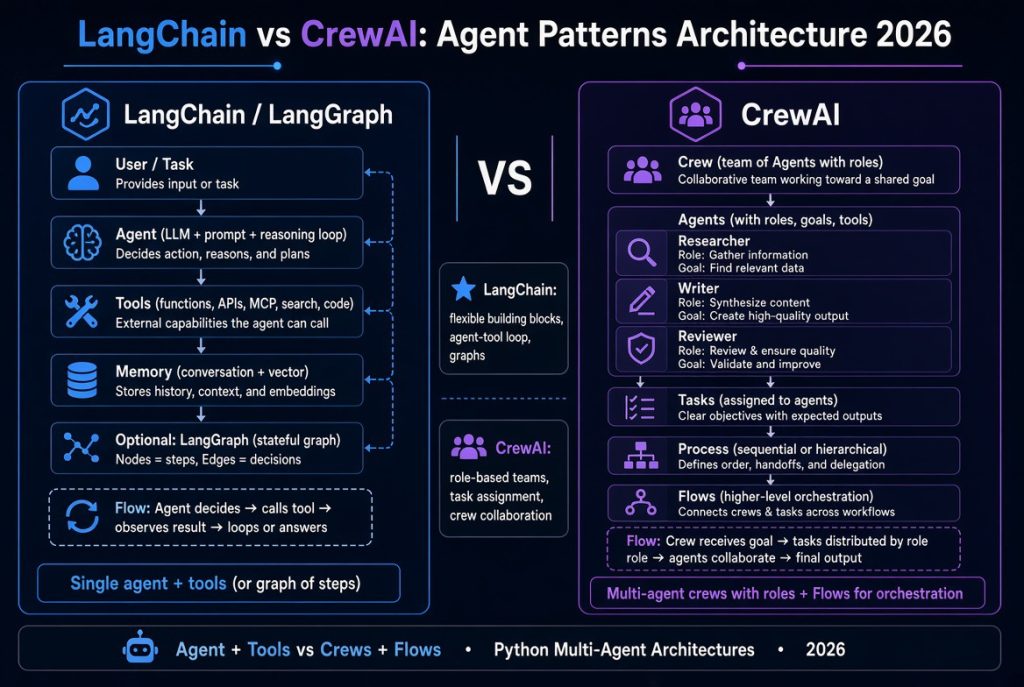
A LangChain vs CrewAI comparison helps developers decide how to build AI agents that can use tools, retrieve information, coordinate tasks, and automate multi-step work. Both frameworks support AI-powered applications, but they organize development differently. LangChain offers flexible building blocks for model integrations and tool-using agents, while CrewAI emphasizes specialized agents, collaborative tasks, and structured workflows.
Imagine building an AI assistant for a travel agency. It needs to research destinations, compare travel options, prepare itineraries, answer customer questions, and interact with a booking system. You could build a flexible agent that selects from approved tools, or create a workflow that assigns research, analysis, and review to specialized agents.
Both approaches can work. The real question is which architecture makes your application easier to develop, evaluate, secure, and maintain.
Quick Answer: LangChain vs CrewAI
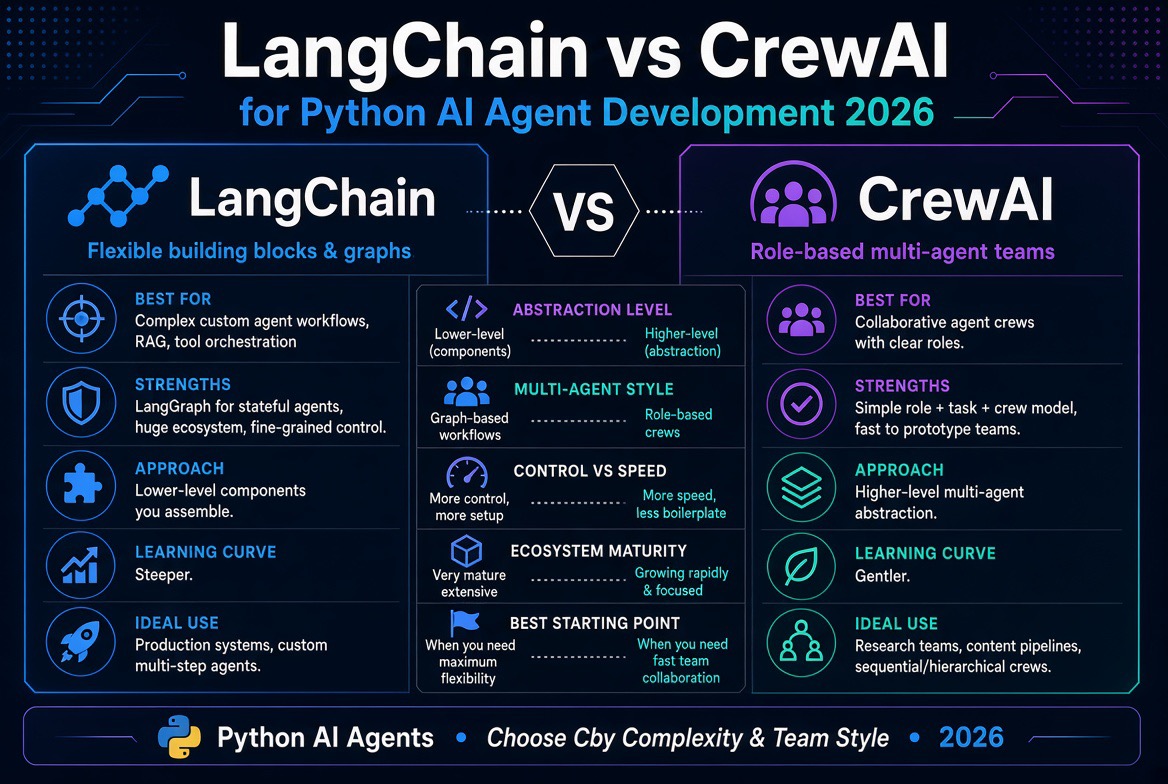
Choose LangChain when you need a flexible AI application with model integrations, tool calling, retrieval, and the freedom to customize agent behavior. When you need explicit stateful orchestration, evaluate LangGraph, which is part of the broader LangChain ecosystem.
Choose CrewAI when your task naturally divides into specialized responsibilities, such as research, analysis, writing, and review. Crews support collaborative agent work, while Flows provide structured execution, branching, and state management.
Our recommendation: Start with the simplest architecture that solves the problem. A single agent or ordinary Python workflow may be better than a multi-agent system. Compare frameworks using the same model, test cases, tools, and success criteria before committing to either.
This guide compares the frameworks across architecture, Python development, integrations, multi-agent orchestration, cost, performance, security, testing, and deployment. It also explains when neither framework is necessary.
LangChain vs CrewAI at a Glance
| Category | LangChain | CrewAI |
|---|---|---|
| Core approach | Composable components and tool-using agents | Specialized agents, tasks, Crews, and Flows |
| Typical starting point | An agent connected to approved tools | A task divided among defined roles or a structured Flow |
| Multi-agent development | Available through orchestration patterns, including LangGraph | A central use case for Crews, coordinated through tasks and processes |
| Explicit workflow control | LangGraph provides stateful graph-based orchestration | Flows provide event-driven execution, state, and branching |
| Language ecosystem | Python and JavaScript/TypeScript offerings | Python-centered framework |
| Best-fit scenarios | Flexible assistants, retrieval, tool use, and customized agent behavior | Collaborative research, content operations, and role-based agent workflows |
| Observability | Application instrumentation and options such as LangSmith | Application instrumentation and optional CrewAI platform capabilities |
| License and operating costs | Framework licensing is separate from model, hosting, and platform expenses | Framework licensing is separate from model, hosting, and platform expenses |
This is a comparison of common design approaches, not a claim that one framework always performs better. Both evolve, and the capabilities available to a particular project depend on the versions, integrations, and deployment choices involved.
What Is LangChain?
LangChain is an open-source framework ecosystem for building applications powered by large language models (LLMs). It provides components and abstractions that help developers connect models with tools, data sources, and application logic.
Without a framework, a developer may need to build much of the model interaction, tool handling, message management, and execution logic directly. LangChain provides reusable patterns that can reduce this work, although a framework does not remove the need for sound application design.
How LangChain works
A typical tool-using LangChain agent follows a cycle:
- Receive a user request.
- Pass relevant instructions and context to a language model.
- Allow the model to request an approved tool when necessary.
- Validate and execute the requested tool call.
- Return the tool result to the model.
- Continue if more work is required.
- Return a final answer or a controlled failure response.
For example, a customer-support assistant could look up an order, retrieve the latest delivery status, and explain the result. The model helps interpret the request and decide what information is needed. The application remains responsible for authorization, tool execution, validation, and other operational controls.
Current LangChain agent development includes the create_agent API. LangChain agents use LangGraph primitives underneath, while LangGraph exposes lower-level capabilities for developers who need more explicit control over state and execution.
For current installation instructions and API details, consult the official LangChain documentation. Older tutorials may use APIs that have since changed, so copying an example without checking its version can lead to avoidable errors.
Key LangChain capabilities
- Model integrations: Connect supported language models through provider-specific integrations.
- Tool calling: Expose controlled Python functions and other supported capabilities to an agent.
- Retrieval: Build applications that retrieve relevant information from documents and knowledge sources.
- Structured output: Request data in defined formats where supported by the selected model and integration.
- Middleware: Customize aspects of agent execution and behavior.
- Workflow customization: Use LangGraph for more explicit state, branching, persistence, and orchestration.
- Evaluation and tracing options: Use tools such as LangSmith or other compatible observability systems to inspect application behavior.
Where LangChain stands out
LangChain is useful when the application needs to combine different capabilities without forcing the entire design into a team-of-agents structure.
Consider an internal business assistant that searches company policies, retrieves a customer’s authorized account information, calculates an invoice total, and prepares a response. These operations have different requirements, but they do not necessarily need separate AI agents.
A single agent with carefully selected tools may be sufficient. LangChain gives the developer a starting point, while LangGraph can provide more control if the workflow becomes stateful or requires explicit transitions.
For developers exploring retrieval-augmented generation, tool use, and general-purpose AI applications, the ecosystem is worth evaluating. The trade-off is that its flexibility can create more architectural decisions for the developer.
What Is CrewAI?
CrewAI is a Python-focused framework for creating AI agents and coordinating their work. It is particularly approachable when a problem can be divided into distinct responsibilities, such as researching a topic, analyzing findings, drafting a report, and reviewing the final output.
Think of a market-research project. One specialist gathers information, another compares competitors, and a third prepares a structured summary. CrewAI lets developers represent this arrangement through agents, tasks, and orchestration logic.
These agents are not dependable digital employees. Each is still a software component using AI, and each can misunderstand instructions, miss relevant information, or generate unsupported claims. Role definitions help organize the workflow, but they do not guarantee accuracy.
How CrewAI works
CrewAI has two central concepts: Crews and Flows.
- Crews: Groups of specialized agents that collaborate on tasks requiring research, reasoning, or other flexible work.
- Flows: Structured workflows that manage state, events, branching, and the sequence of operations. A Flow can invoke a Crew when collaborative agent work is useful.
For example, a content-research application might use a Flow to validate a topic, establish the required output format, and retrieve source material. It could then invoke a Crew containing research and editorial-review agents. Once the Crew returns its work, the Flow could validate required fields, save the report, and request human approval.
This division matters. Predictable operations belong in the workflow where possible; open-ended tasks can be assigned to agents. The result can be easier to reason about than an arrangement in which every agent decides what should happen next.
Read the official CrewAI documentation for current guidance on agent configuration, task design, Crews, Flows, and installation.
Key CrewAI capabilities
- Role-based agents: Define responsibilities and goals for different agents.
- Task coordination: Organize work into assignments with expected outputs.
- Delegation: Configure collaboration and delegation behavior where appropriate.
- Tool integration: Connect agents to approved tools and custom functions.
- Sequential or other supported processes: Structure how tasks are assigned and completed.
- Flows: Manage state, events, conditional logic, and the overall execution path.
- Production platform options: Evaluate optional deployment and management services separately from the core framework.
Where CrewAI stands out
CrewAI is attractive when the responsibilities themselves help explain the application architecture.
For example, a sales-research workflow may need to collect public company information, compare prospects against qualification criteria, summarize business opportunities, and prepare a briefing for a salesperson. A team-oriented design can make those responsibilities easy to identify and adjust.
However, creating a separate agent for every step is not automatically a good design. If one deterministic function can calculate a score or validate an email address, that function will usually be easier to test than an LLM agent performing the same task.
CrewAI’s advantage is not the number of agents it lets you create. It is the ability to organize genuinely collaborative work while retaining a structured way to manage execution.
LangChain vs CrewAI: The Architectural Difference
The clearest way to compare the frameworks is to ask how you want to express the work.
LangChain: build around model interactions and tools
With LangChain, a developer can begin with an agent and a set of approved tools. The model can request a tool call, and the surrounding application executes that call and supplies the result.
This is useful when the workflow is dynamic but does not necessarily require several agents with separate roles.
When more control becomes necessary, LangGraph supports explicit stateful orchestration. Developers can represent the application as nodes and transitions, define branching conditions, and implement controlled paths through the workflow.
User request
     |
     v
Agent / model
     |
     v
Select an approved tool?
     |
     +---- No ----> Final response
     |
     +---- Yes ---> Validate request
                         |
                         v
                    Execute tool
                         |
                         v
                    Inspect result
                         |
                         v
                    Continue or stop
This pattern is useful for customer assistants, retrieval applications, internal tools, and agents that need to interact with several services.
CrewAI: combine specialist agents with controlled workflows
CrewAI encourages developers to describe collaborative work in terms of agent roles and tasks. A Crew handles a section of work that benefits from collaboration, while a Flow can manage the broader process.
Incoming request
       |
       v
   Validate input
       |
       v
    CrewAI Flow
       |
       v
 Research Crew
   /    |     \
Research Analysis Review
 Agent   Agent  Agent
       |
       v
 Validate output
       |
       v
 Human approval
       |
       v
 Publish or deliver
The benefit is a clear separation between the workflow’s predictable structure and the agent collaboration inside it.
Which architecture is simpler?
For a small assistant with a few tools, LangChain may be the more direct starting point. For a task that already divides naturally into specialist responsibilities, CrewAI may make the design easier to communicate.
Neither framework eliminates the hard parts of production engineering. Both require thoughtful state management, error handling, authorization, validation, testing, and monitoring.
Our take: the simplest architecture that meets the requirements is usually the best architecture. A multi-agent diagram can look sophisticated while hiding repeated model calls, unnecessary coordination, and difficult failure recovery.
LangChain vs CrewAI: Python Code Examples
Code helps make the difference concrete. The examples below illustrate the structure of each approach. They are starting points, not complete production applications. Exact APIs, integrations, and configuration requirements can change between versions.
Example 1: A simple LangChain agent
Install LangChain and the integration package required by your model provider. For example, a provider-specific integration may need to be installed separately from the main framework. Keep credentials in environment variables or a secrets manager rather than hard-coding them into source code.
from langchain.agents import create_agent
def get_business_hours(day: str) -> str:
    """Return opening hours for a supported day."""
    hours = {
        "Monday": "9:00 AM to 5:00 PM",
        "Saturday": "10:00 AM to 2:00 PM",
        "Sunday": "Closed",
    }
    return hours.get(day, "Please confirm with the business.")
agent = create_agent(
    model="your-provider:your-model",
    tools=[get_business_hours],
    system_prompt=(
        "Answer business-hours questions accurately. "
        "Use the available tool when opening hours are requested. "
        "Do not invent hours that the tool does not provide."
    ),
)
result = agent.invoke({
    "messages": [
        {
            "role": "user",
            "content": "What time do you open on Saturday?"
        }
    ]
})
print(result)
The model identifier is a placeholder. Follow the current provider integration instructions for the correct package, model name, and authentication settings. See the LangChain Python documentation.
The important design decision is that the application exposes a narrow function rather than giving the model unrestricted access to the business database. In a real system, the function could retrieve opening hours from an authorized database or business API.
For production use, also consider how to handle unavailable data, invalid tool arguments, timeouts, repeated calls, and requests that fall outside the agent’s permissions.
Example 2: A role-based CrewAI workflow
The following example demonstrates how to organize a research task into roles and expected outputs.
from crewai import Agent, Task, Crew, Process
researcher = Agent(
    role="Travel Researcher",
    goal="Gather useful destination information",
    backstory=(
        "You research destinations and identify relevant details "
        "that need verification."
    ),
    verbose=True,
)
reviewer = Agent(
    role="Travel Information Reviewer",
    goal="Identify gaps and unsupported claims",
    backstory=(
        "You review travel research for clarity, completeness, "
        "and claims that need checking."
    ),
    verbose=True,
)
research_task = Task(
    description=(
        "Prepare a concise destination overview for the requested "
        "location. Flag information that needs verification."
    ),
    expected_output=(
        "A structured destination research summary with verification notes."
    ),
    agent=researcher,
)
review_task = Task(
    description=(
        "Review the research summary, identify missing details, "
        "and flag claims that require confirmation from reliable sources."
    ),
    expected_output=(
        "A reviewed summary with gaps and verification requirements."
    ),
    agent=reviewer,
)
crew = Crew(
    agents=[researcher, reviewer],
    tasks=[research_task, review_task],
    process=Process.sequential,
)
result = crew.kickoff()
print(result)
This illustrates sequential task coordination. It does not automatically provide live travel prices, flight availability, hotel inventory, or booking access. Those features require appropriate integrations, authorized credentials, and trustworthy data sources.
For example, if the agent recommends a hotel, the application should not treat a generated price as a verified current offer. It should retrieve price and availability from an authorized source and validate the result before presenting it as bookable.
What the examples actually demonstrate
The LangChain example starts with an agent and a tool. The CrewAI example starts with roles and coordinated tasks. Neither approach makes the underlying model inherently more intelligent.
In both cases, performance depends on the model, instructions, data quality, tools, task design, and evaluation process. A poorly designed CrewAI workflow can produce weak results, just as a poorly designed LangChain agent can.
If you are new to agent development, continue with Building AI Agents with Python: Complete 2026 Guide.
LangChain vs LangGraph vs CrewAI: Understanding the Difference
One common source of confusion is treating LangChain and LangGraph as interchangeable products, then comparing both against CrewAI as though all three provide exactly the same abstraction.
They are related, but the distinction matters when selecting an architecture.
| Technology | Primary role | Consider it when |
|---|---|---|
| LangChain | Framework components and agent abstractions | You want to build a model-powered application with tools and integrations. |
| LangGraph | Stateful graph-based orchestration | You need more explicit control over transitions, state, persistence, and execution. |
| CrewAI | Agent teams and structured workflow execution | Your application benefits from specialized agents, tasks, Crews, and Flows. |
LangChain’s documentation explains that its agent implementations use LangGraph primitives. Developers who need finer control can build more directly with LangGraph rather than forcing every workflow into a high-level agent abstraction. See the official LangChain and LangGraph learning resources.
CrewAI’s own documentation describes Crews as suited to collaborative agent work and Flows as suited to structured, event-driven orchestration. These are complementary capabilities, not competing modes that must always be used separately.
Our recommendation is to compare the level of control your application needs. If you only need one agent and a few tools, a high-level abstraction may be sufficient. If you need explicit checkpoints, branching, retries, and approval gates, evaluate the workflow capabilities directly.
Best Use Cases: When to Choose LangChain
LangChain is a strong candidate when you need a flexible AI application that combines model calls, retrieval, tools, and custom business logic.
1. Customer-support assistants
A support assistant may need to search a knowledge base, retrieve an order status, check a delivery update, and prepare a response. A tool-using agent can coordinate these operations while the application enforces customer authorization and data-access rules.
Not every support workflow needs multiple agents. If the same assistant can safely retrieve the required information and formulate a useful response, adding a separate research agent and response agent may increase complexity without improving service quality.
2. Document and knowledge assistants
Organizations often need to search policies, contracts, technical documents, product manuals, and internal procedures. LangChain can be used as part of a retrieval-augmented generation (RAG) system that fetches relevant information before a model generates an answer.
RAG does not guarantee that an answer is correct, but it gives the application a way to ground responses in retrieved content. The system should still evaluate source relevance, handle missing information, and avoid presenting unsupported conclusions as facts.
3. Internal business assistants
An internal assistant could retrieve authorized company information, calculate figures using deterministic functions, and prepare a report. A flexible tool-based architecture can be easier to manage than creating an agent for every department or operation.
4. Developer tools and AI applications
Developer-facing applications may combine code search, documentation retrieval, issue tracking, repository inspection, and test execution. LangChain can help connect model interactions with these tools, while a more explicit orchestration layer can manage risky or long-running operations.
5. Applications with complex state
When a workflow must pause for approval, resume after a failure, maintain state across steps, or branch based on validated results, evaluate LangGraph. The important requirement is not simply that the workflow is complex; it is that execution must be controlled and recoverable.
Best Use Cases: When to Choose CrewAI
CrewAI is worth evaluating when a problem benefits from distinct responsibilities and the application needs a clear way to coordinate them.
1. Market research
A research workflow might gather information about competitors, compare their products, identify market trends, and prepare a summary. Specialist roles can help organize the work, while a review step can identify missing evidence.
However, a reviewer agent is not an independent guarantee of truth. If both agents rely on the same incorrect source or repeat the same assumption, the review may simply reinforce the error. Important claims should be checked against reliable evidence.
2. Content operations
A content workflow could involve research, outlining, drafting, factual review, and editorial checks. CrewAI can model these responsibilities explicitly, while a Flow handles predictable steps such as checking required fields, saving a draft, or routing an article for approval.
For a publishing operation, deterministic checks should still handle matters such as missing metadata, broken links, HTML validity, and required fields. An AI reviewer may help assess clarity or topical coverage, but it should not replace automated validation where rules are unambiguous.
3. Sales research and lead preparation
A sales workflow may gather public company information, compare a prospect against defined criteria, and prepare a briefing for a salesperson. Separate responsibilities can make the workflow easier to understand and improve.
But the system should not invent contact information, send unsolicited messages without appropriate controls, or automatically update a CRM based on unverified assumptions. A structured workflow can validate inputs and route proposed changes for review.
4. Travel planning
A travel assistant could research destinations, compare verified options, and draft an itinerary. CrewAI may suit the research and synthesis stages if those tasks benefit from collaboration.
Actual booking, payments, cancellation, and customer-record updates should use authorized application integrations with explicit validation. A generated itinerary is not a reservation confirmation.
5. Business reporting
One agent might summarize operational metrics while another drafts management commentary. This can help with narrative reporting, provided the underlying figures come from validated data and the system distinguishes measured facts from interpretations.
Our view: CrewAI makes most sense when dividing the work creates a real benefit. If the task is simply to retrieve one database record and format it, a function is usually a better choice than a team of agents.
A Practical Business Example: Automating a Travel Agency
Suppose a travel agency wants to reduce the time staff spend preparing holiday packages. The goal is not to let AI operate the entire business without oversight. It is to automate information gathering and drafting while preserving control over pricing, reservations, and customer commitments.
- Collect requirements: A form captures destination, dates, budget, number of travelers, and preferences.
- Validate the request: Ordinary application code checks required fields, date ranges, and basic business rules.
- Retrieve current options: Authorized integrations retrieve available flights, accommodation, and relevant travel information.
- Research and summarize: An agent gathers destination information and highlights relevant considerations.
- Compare options: Deterministic code calculates totals and applies business constraints using verified prices.
- Draft the itinerary: An AI component explains the trade-offs and produces a customer-friendly proposal.
- Review the proposal: Staff verify the details before sending the offer.
- Confirm the booking: The booking system processes the actual reservation and returns a verified confirmation.
LangChain could be suitable for the tool-using agent and its integrations. CrewAI could be suitable if the research, comparison, and review stages benefit from coordinated specialist agents. Either framework can support a broader application, but neither needs to handle every step.
The strongest design may use ordinary Python for validation, calculations, database updates, and booking transactions, with AI used only for tasks that require interpretation or flexible synthesis.
For additional business examples, see The Complete AI Agents for Business Guide.
LangChain vs CrewAI: Performance, Cost, and Scalability
There is no universal performance result that makes one framework the winner for every application. Overall performance depends on the model, number of model calls, prompt size, tools, external service latency, workflow design, and failure-recovery strategy.
Execution speed
A single agent completing a task in two model calls may be faster than a multi-agent workflow in which several agents research, summarize, critique, and revise the same information.
However, extra steps may be justified if they catch important errors or improve the final result. The right comparison is not simply which system responds first. It is which system meets the required quality and reliability targets within an acceptable time.
Parallel execution can reduce elapsed time when tasks are genuinely independent, but it may increase simultaneous API usage, resource consumption, and coordination complexity. It should be measured rather than assumed to be an improvement.
AI model costs
Both frameworks can incur model usage costs. An open-source framework does not make the language models it calls free, and optional hosted services, monitoring tools, databases, and infrastructure can add expenses.
Important cost drivers include:
- Number of model calls per task.
- Input and output token usage.
- Choice of model and provider.
- Retries and repeated work.
- External API usage and data retrieval.
- Hosting, storage, and observability.
- Human review and ongoing maintenance.
A multi-agent workflow can multiply costs if every agent independently researches, summarizes, and revises the same material. Use additional agents only when they improve measurable outcomes.
Scalability
Scalability depends on the entire application architecture, not just the agent framework. A production service may need request queues, background workers, database connection management, rate limiting, concurrency controls, and a strategy for recovering interrupted tasks.
For long-running workflows, avoid relying on one HTTP request remaining open for the entire job. Consider durable task execution, persisted state, and a way to resume work after an interruption.
Both ecosystems can be part of larger systems, but the implementation and hosting choices determine whether the application can handle the workload reliably.
How to benchmark fairly
To compare LangChain and CrewAI for a real project, build small prototypes using:
- The same model and model settings where possible.
- The same input data and external tools.
- The same set of representative test cases.
- The same definition of a successful result.
- The same constraints on permissions and external actions.
- The same logging and cost-measurement approach.
Measure task completion rate, factual accuracy, correct tool selection, invalid tool calls, latency, model usage, recovery from errors, and the amount of custom code needed. For subjective outputs, include a consistent human-review process or a carefully validated evaluation method.
Do not decide based on one impressive demonstration. A framework that performs well on a carefully selected example may struggle with incomplete information, ambiguous requests, unexpected tool responses, or network failures.
Memory, State, and Workflow Management
Agent applications need to manage context and state, but these concepts are not interchangeable.
- Conversation history: Messages exchanged during an interaction.
- Task state: Structured information about what has happened, what remains to be done, and whether approval is required.
- Persistent memory: Information retained across sessions where appropriate and permitted.
- Retrieval: Relevant documents or records fetched when a task needs them.
For example, a travel proposal workflow may store the requested dates, destination, verified price results, selected options, review status, and booking status. These fields should be represented as structured application data rather than left entirely to a model’s interpretation of a long conversation.
LangGraph is worth evaluating when explicit state transitions and resumable execution are important. CrewAI Flows can manage structured execution and state around agent tasks. In either case, developers must decide what information is persisted, how it is validated, and who can access it.
Memory should also have clear retention rules. Keeping every conversation indefinitely can increase privacy, security, and data-management risks. Store only what the application needs, and apply appropriate access and deletion controls.
Integrations and Ecosystem Considerations
Integration support matters because an agent is only useful when it can access the information and actions required for its task.
Model providers
Both frameworks can work with supported model integrations, but setup details and feature compatibility vary. Some models support tool calling or structured outputs differently, and provider-specific behavior can affect the application.
Before choosing a framework, confirm that the model you intend to use supports the required features and that the relevant integration is actively maintained. Do not assume that a shared interface means all providers behave identically.
External tools and business systems
Agents may need to interact with CRM systems, ticketing platforms, document stores, internal APIs, databases, and third-party services. Tool availability alone is not sufficient. Each integration needs authentication, authorization, input validation, error handling, and limits on what actions it can perform.
For example, a sales assistant may be permitted to read a prospect record and prepare an update but not change customer ownership or send a campaign without approval.
MCP and tool interoperability
The Model Context Protocol (MCP) is an open protocol designed to standardize how AI applications connect to external tools and context sources. It can be relevant when you want to expose supported capabilities through a common interface.
MCP does not automatically make a tool safe. A connected server may expose sensitive actions, and the application still needs to authenticate users, restrict permissions, validate requests, and monitor execution.
Read MCP: Model Context Protocol Explained for more context. The protocol should be considered an integration option, not a replacement for application security or good architecture.
Security: Which Framework Is Safer?
Neither LangChain nor CrewAI should be considered automatically secure simply because it provides agent abstractions. Security depends on the complete application, its tools, the model, the data it retrieves, and the permissions granted to the workflow.
AI agents can be exposed to prompt injection, excessive tool permissions, sensitive-data disclosure, malicious tool inputs, insecure external content, and unintended actions. These risks deserve particular attention when agents can change business records, issue refunds, send communications, or operate infrastructure.
1. Apply least-privilege access
Give each agent only the tools and data required for its role. A research agent generally does not need payment credentials or unrestricted access to production administration functions.
Where possible, enforce access restrictions in the application and underlying service rather than relying only on instructions in a prompt.
2. Validate every consequential tool call
Do not treat a model-generated tool request as trusted input. Validate argument types, identifiers, ranges, user authorization, and business rules before executing an operation.
For example, a refund tool should verify that the order exists, the requester is authorized, the refund is within the permitted limit, and the order is eligible under the company’s rules. The agent’s reasoning is not a substitute for these checks.
3. Separate read, prepare, and execute permissions
Reading a record is not equivalent to changing it. Preparing an email is not equivalent to sending it. Generating a payment instruction is not equivalent to transferring money.
Use separate capabilities for these actions where appropriate. Require explicit approval for consequential operations, and ensure that the approval is tied to the exact action being approved.
4. Protect secrets and sensitive information
Store API keys and credentials in environment variables or a managed secrets system. Avoid placing secrets in prompts, logs, source control, or generated reports. Limit access to personal and confidential data and redact sensitive information from observability records where appropriate.
5. Test for prompt injection and misuse
Retrieved documents, emails, web pages, and other external content may contain instructions designed to manipulate an agent. Treat this content as untrusted data, not as a higher-priority source of authority.
Test whether the agent can be tricked into exposing data, invoking unauthorized tools, bypassing approval, or treating malicious content as an instruction. Verify that controls work even when the model produces an unexpected response.
6. Monitor actions and preserve auditability
Record important tool calls, authorization decisions, state changes, failures, and approval events. Logs should help investigators understand what happened without unnecessarily storing sensitive information.
For further guidance, read the AI Agent Security Risks guide and consult the OWASP Top 10 for Agentic Applications 2026.
Our opinion is straightforward: the model should never be your security boundary. Use application-level authorization, deterministic validation, limited permissions, and controlled execution. These principles apply regardless of which framework you choose.
Testing and Evaluating AI Agent Workflows
Traditional unit tests remain essential, but agent applications also need tests that examine how the system uses tools and progresses through a task.
A workflow can return a fluent, convincing answer and still be wrong. It may call the wrong tool, omit an important step, use stale information, or claim that an action succeeded when the external system rejected it.
What should you test?
- Answer quality: Is the response accurate, relevant, and complete?
- Tool selection: Did the agent use the appropriate tool?
- Argument validity: Were identifiers and parameters valid?
- Permission enforcement: Were unauthorized actions rejected?
- Workflow correctness: Did the application follow the required sequence?
- Failure handling: Did the system recover appropriately from timeouts and errors?
- Stopping behavior: Did it finish when appropriate instead of looping?
- Data protection: Did it avoid exposing restricted information?
- Cost and latency: Did the task remain within operational limits?
Build an evaluation dataset
Prepare a collection of realistic requests and expected outcomes. Include straightforward cases, incomplete requests, ambiguous inputs, tool failures, and adversarial examples. Run the same dataset against new versions so that changes can be compared consistently.
For example, a customer-support agent should be tested with a valid order, a nonexistent order, an order belonging to another customer, an unavailable order service, and a request to perform an action outside the agent’s permissions.
Some checks should be deterministic. If the expected order ID is known, code can verify whether the correct tool received that ID. Other qualities, such as whether a summary is useful, may require human review or a carefully designed evaluator.
Tools such as LangSmith evaluation describe approaches for offline benchmarking, regression testing, and online monitoring. You can also build a framework-independent evaluation pipeline around your own test cases and metrics.
Test the workflow, not just the final answer
For a multi-agent application, evaluate intermediate behavior as well as the final response. Did the research agent use reliable sources? Did the reviewer identify unsupported claims? Did the workflow validate required fields before continuing?
Several agents can produce a polished final report while sharing the same incorrect assumption. Intermediate checks help reveal that failure mode.
Do not assume that adding an agent for review automatically improves accuracy. Measure whether it actually catches errors on your test dataset.
Deployment and Production Readiness
Moving an agent from a notebook to production involves more than exposing a Python function through an API. The application must handle concurrency, credentials, failures, persistent state, observability, and changes to models or integrations.
Start with a clear service boundary
For a small application, a web service can receive a request, validate it, run the agent workflow, and return a response. Keep the API layer separate from the agent logic and business services so the application can be tested and maintained independently.
Use background workers for long-running tasks
Research, document processing, and multi-agent workflows can take longer than a typical interactive request. A background job system can allow the application to return a job identifier while workers continue the task.
Persist important state and define what happens if a worker crashes or a provider becomes unavailable. Retries should be bounded, and operations that change external state should be designed to avoid duplicate effects.
Manage dependencies and configuration
Pin or constrain dependencies according to your team’s release process, keep development and production configuration separate, and test upgrades before deployment. Agent frameworks and model-provider integrations evolve quickly, so version management is particularly important when tutorials and sample code are changing.
Monitor the complete application
Track latency, failure rates, model usage, external API errors, invalid tool calls, and workflow completion. Monitor both the application and its underlying services. When a task fails, the team should be able to determine whether the problem came from the model, an integration, a permission check, or the workflow itself.
Prepare for recovery
For important workflows, decide whether a failed run can be resumed, restarted, or safely rolled back. Use idempotency controls for operations such as creating tickets or issuing payments when duplicate requests could cause harm.
Neither LangChain nor CrewAI removes these deployment responsibilities. Evaluate the framework in the context of the runtime, persistence, monitoring, and recovery architecture you plan to use.
Common Mistakes When Choosing an AI Agent Framework
Mistake 1: Assuming more agents mean better results
More agents can mean more model calls, more coordination, more failure points, and more difficult debugging. Add an agent only when the separation of responsibilities produces a measurable benefit.
Mistake 2: Choosing based on a demo
A framework demo usually demonstrates a successful path. Real applications must also handle invalid input, missing data, service outages, permission failures, and ambiguous instructions.
Mistake 3: Treating model output as verified data
A confident answer is not proof that a database was updated or a reservation was confirmed. Verify important outcomes using the system that owns the relevant data.
Mistake 4: Ignoring the cost of repeated reasoning
Agents may call models repeatedly to plan, execute, summarize, critique, and revise. Measure the complete workflow rather than looking only at the cost of one model call.
Mistake 5: Relying on prompts for security
Instructions such as “never access another customer’s data” are useful, but they are not a replacement for authorization checks. Enforce sensitive rules in application code and the underlying services.
Mistake 6: Using an agent for deterministic work
Use normal Python for calculations, validation, access control, fixed business rules, and other predictable operations. AI is most valuable where interpretation, flexible reasoning, or synthesis provides a genuine advantage.
When You Should Use Neither LangChain nor CrewAI
This is an important part of the comparison because choosing a framework is not always necessary.
If your application needs to perform a known sequence of operations, ordinary Python may be simpler, faster, cheaper, and easier to test.
Consider these examples:
- Calculate an invoice total using fixed rules.
- Validate a form against a schema.
- Retrieve an order using a known identifier.
- Send a notification after a confirmed database update.
- Run a scheduled report with a fixed set of queries.
- Process records using a predictable ETL pipeline.
None of these tasks automatically needs an autonomous agent. You can use deterministic application logic and introduce an LLM only where the task involves unstructured language or flexible interpretation.
For example, an invoice-processing application might use AI to extract fields from a supplier document, but conventional code should validate totals, check required fields, and enforce payment rules.
Our take: the most valuable AI architecture is not the one with the most autonomy. It is the one that applies autonomy selectively, where it improves the result enough to justify its cost and risk.
LangChain vs CrewAI: Which Framework Is Better for Beginners?
Both can be reasonable learning choices, depending on what you want to build first.
Choose LangChain if you want to learn how a model works with tools, how to build retrieval-based applications, and how to connect AI capabilities to existing software. You can start with one agent and gradually explore more advanced orchestration.
Choose CrewAI if you want to learn how specialized agents can divide a task, how tasks depend on one another, and how structured workflows can coordinate collaborative work.
Neither removes the need to understand Python, APIs, JSON, exception handling, environment variables, authentication, and basic software testing.
A good learning sequence is:
- Build a simple Python program that calls a model.
- Create one safe tool with a narrow responsibility.
- Build a single-agent application.
- Add validation, logging, and error handling.
- Create a small evaluation dataset.
- Try a multi-agent workflow only when the problem calls for it.
- Deploy the application with controlled permissions and monitoring.
This progression teaches the underlying engineering principles rather than tying your skills to one framework’s abstractions.
LangChain vs CrewAI: Which Framework Should You Choose?
| Your requirement | Starting point to evaluate | Why |
|---|---|---|
| A chatbot with a few tools | LangChain | A direct agent-and-tools pattern may be sufficient. |
| Broad model and tool integration needs | LangChain | Its ecosystem provides reusable components and integrations. |
| Research coordinated across specialist roles | CrewAI | Agents, tasks, and Crews make collaboration explicit. |
| Stateful workflows with explicit transitions | Evaluate LangGraph and CrewAI Flows | Compare state handling, branching, recovery, and approval requirements. |
| JavaScript/TypeScript-first team | LangChain ecosystem | LangChain offers a JavaScript/TypeScript ecosystem. |
| Long-running work that must resume after failure | Prototype both against your requirements | Persistence and recovery behavior must be verified in the actual implementation. |
| Lowest possible operating cost | Benchmark both—and ordinary code | Model calls, tool usage, hosting, and maintenance drive total cost. |
| Sensitive operations requiring approval | Either, with application-level controls | Security depends on authorization and execution boundaries, not the framework name. |
Our recommendation
For a developer learning agent engineering, start with a single agent, a few tools, and a narrowly defined task. LangChain is a sensible starting point for exploring general-purpose tool-using agents and integrations. CrewAI is worth exploring when your first project genuinely involves specialized agents collaborating on a shared outcome.
Then build a small proof of concept in the other framework. Use the same task, data, model, and evaluation criteria. Compare accuracy, completion rate, latency, cost, failure recovery, and the amount of custom code required.
If you need explicit workflow control, evaluate LangGraph rather than treating LangChain and LangGraph as interchangeable names. Similarly, evaluate CrewAI Flows alongside Crews rather than judging the framework only by a multi-agent demonstration.
The practical winner is the architecture that produces dependable results within your cost, security, and maintenance limits.
Production Checklist for AI Agent Frameworks
Before deploying a LangChain or CrewAI application, review the following checklist.
- Define the exact business problem and measurable success criteria.
- Use the smallest number of agents and tools that can solve the task.
- Validate all inputs and tool arguments.
- Enforce permissions outside the model prompt.
- Store credentials securely and limit access to sensitive data.
- Use timeouts and bounded retries for external services.
- Prevent duplicate effects for important operations.
- Persist task state when work must survive interruptions.
- Require approval for consequential or irreversible actions.
- Log important actions without unnecessarily exposing private information.
- Test tool use, failure handling, prompt injection, and authorization.
- Evaluate quality, latency, cost, and regressions before release.
- Verify external actions against the system that owns the data.
- Document how the application stops, recovers, and escalates failures.
- Reassess dependencies and framework APIs during upgrades.
These controls are more important to production readiness than whether an application uses a fashionable framework. Framework selection should support a sound architecture, not substitute for one.
Related Resources
- The Complete AI Agents for Business Guide
- AI Agent Frameworks Comparison: LangChain vs CrewAI vs AutoGen
- Building AI Agents with Python: Complete 2026 Guide
- Agent-to-Agent Communication Explained
- Multi-Agent Systems Explained
- MCP: Model Context Protocol Explained
- AI Agent Security Risks
- AI Tools for Developers in 2026
- More technology news and analysis
Conclusion: LangChain vs CrewAI in 2026
LangChain and CrewAI offer useful but different ways to build AI-powered applications. LangChain provides flexible components and agent abstractions for connecting models, tools, and data. LangGraph adds more explicit stateful orchestration when a workflow requires tighter control. CrewAI emphasizes specialized agents and collaborative tasks, with Flows providing a structured way to manage execution.
Neither framework automatically produces a reliable autonomous application. The quality of the result depends on the model, tools, data, workflow design, validation, permissions, testing, and monitoring.
For most developers, the sensible approach is to start small. Build a single agent or deterministic workflow, measure what it can do, and add more elaborate orchestration only when the results justify it.
The best AI agent framework is not the one that makes the most agents possible. It is the one that helps you build a system you can understand, test, secure, and trust.
Frequently Asked Questions
1. Is LangChain better than CrewAI?
Neither is universally better. LangChain is a strong option for flexible agents, model integrations, and tool-using applications. CrewAI is particularly useful for coordinating specialized agents through tasks, Crews, and Flows. Choose according to your workflow and production requirements.
2. Is CrewAI built on LangChain?
No. CrewAI describes itself as an independent framework rather than a framework built on LangChain. The two ecosystems have different architectural approaches, although both can integrate with external models and tools.
3. Is LangChain or CrewAI better for beginners?
LangChain can be a good starting point for learning tool-using agents and model integrations. CrewAI can be easier to visualize when a project involves several specialized agents collaborating on tasks. The best starting point depends on the first application you want to build.
4. Can LangChain and CrewAI work with different AI models?
Both support model-provider integrations, but compatibility, features, and configuration vary by provider and integration. Check the current documentation to confirm that your selected model supports the features your application requires.
5. Is CrewAI free to use?
The open-source CrewAI framework is available under its applicable license, but using it may still involve costs for model APIs, hosting, databases, and optional commercial services. Review the current license and service terms for your intended use.
6. Can I use LangChain to build multi-agent systems?
Yes. The LangChain ecosystem includes LangGraph, which supports stateful workflows and multi-agent orchestration patterns. The best design depends on how much control you need over execution, state, and coordination.
7. Which framework is better for production applications?
Either framework can be part of a production application if the complete system is engineered appropriately. Evaluate security, reliability, monitoring, state management, error recovery, testing, and operational costs rather than relying on the framework choice alone.
8. Is CrewAI better for multi-agent systems?
CrewAI is a natural option for role-based collaboration because Crews organize agents around responsibilities and tasks. However, multi-agent workflows can also be built with LangGraph. Compare both approaches against the specific coordination and state-management requirements of your application.
9. Should I use LangChain or CrewAI for a simple chatbot?
A simple chatbot may not need a multi-agent framework at all. If it only answers from a fixed prompt or calls one straightforward service, ordinary application code and a model SDK may be enough. Consider LangChain when you need reusable integrations or tool-using agent behavior.
10. Can I use LangChain and CrewAI in the same project?
It may be possible to integrate components from different ecosystems, but doing so introduces additional dependencies and architectural complexity. Prefer one primary orchestration approach unless a specific capability justifies the integration, and verify compatibility with the current versions.

Leave a reply