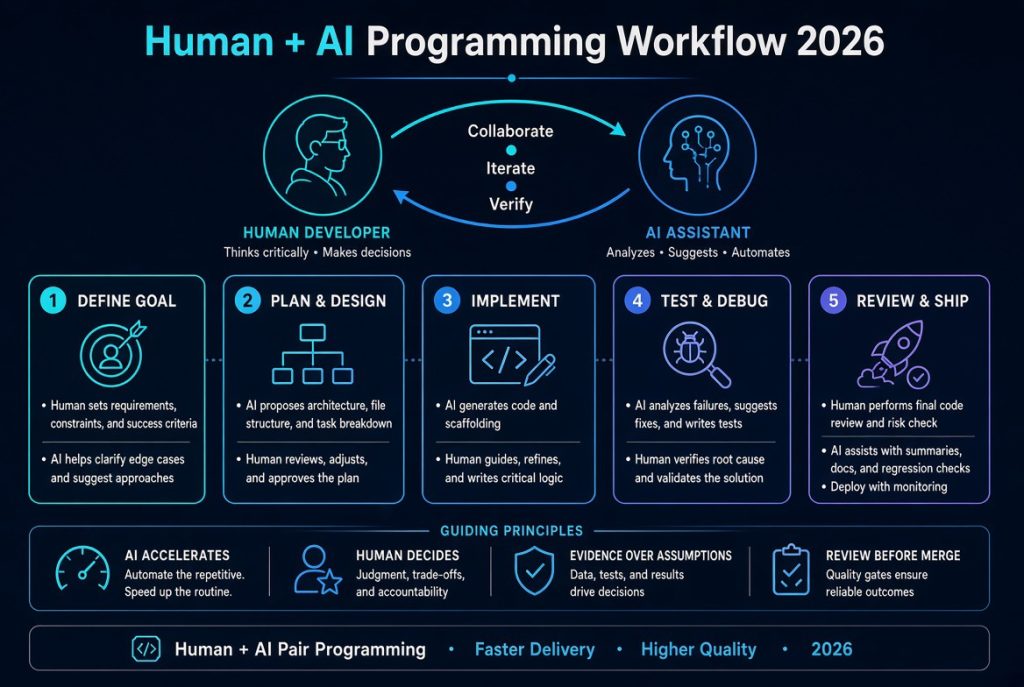
Human + AI Programming Workflow: The Essential 2026 Guide
A human + AI programming workflow combines human engineering judgment with AI-assisted planning, coding, debugging, testing, documentation, and code review. Rather than asking an AI tool to build an entire application and assuming the result is ready, developers use AI to accelerate specific engineering tasks while retaining responsibility for architecture, correctness, security, and production decisions.
Imagine adding a payment feature to an existing business application. An AI coding assistant might inspect the repository, trace the payment flow, suggest an implementation, write tests, and help investigate a failed build. That can save considerable time. But the developer must still confirm the business rules, verify the payment provider’s behaviour, protect credentials, test duplicate transactions and failed payments, and approve the change before deployment.
That distinction is becoming increasingly important in 2026. AI tools can now do considerably more than suggest the next line of code. Some can inspect multiple files, edit a repository, execute commands, run tests, and work through multi-step development tasks. The more capable these tools become, the more important it is to establish boundaries around what they can change and how their work is verified.
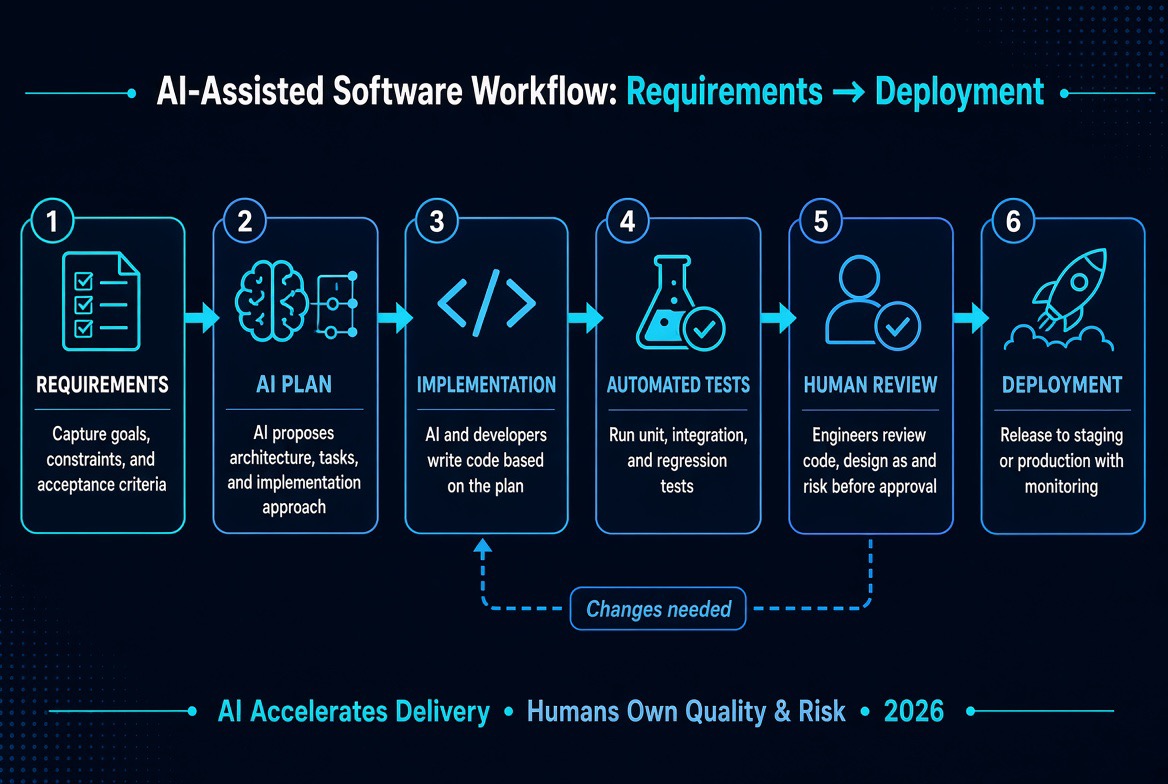
The central principle: Let AI accelerate the work, but use engineering practices to establish whether the result is correct. A productive workflow combines clear requirements, relevant repository context, limited permissions, small implementation tasks, automated feedback, and meaningful human oversight.
Quick Answer: What Is the Best Human + AI Programming Workflow?
The most reliable human + AI programming workflow follows a simple cycle:
- Define: A developer establishes the problem, requirements, constraints, and acceptance criteria.
- Inspect: AI examines the relevant code and proposes an implementation plan.
- Implement: AI assists with a focused, reviewable change.
- Test: Automated checks and real execution provide evidence of correctness.
- Review: A developer inspects the code, security implications, and unexpected changes.
- Release: The change moves through version control, staging, approval, and deployment.
- Improve: Monitoring and feedback reveal what should change in the next development cycle.
Best approach: Use AI for repetitive implementation, code exploration, test generation, and debugging assistance. Keep humans responsible for requirements, architecture, security decisions, verification, and production approval.
AI-generated code is a proposal, not proof that a feature works.
What Is a Human + AI Programming Workflow?
A human-AI programming workflow is a repeatable software development process in which developers and AI tools contribute different capabilities to the same engineering task.
The developer supplies the context that determines what should be built and why. That includes the business objective, existing architecture, user expectations, technical constraints, and acceptable risks. AI can then help explore the codebase, explain unfamiliar components, propose solutions, generate implementation drafts, identify possible defects, and automate repetitive work.
Automated engineering tools provide another layer of feedback. Test runners, type checkers, linters, static-analysis tools, dependency scanners, and build systems can evaluate parts of the result without relying on the AI assistant’s opinion.
This is more than traditional autocomplete. Modern coding assistants and agents may work across several files, invoke development tools, run commands, and complete bounded tasks. Their capabilities vary by product, model, configuration, permissions, and execution environment.
The important distinction is that AI participation does not transfer engineering accountability from the developer to the tool.
What humans contribute
- Product judgment: Understanding what customers and the business actually need, rather than simply implementing whatever appears in a prompt.
- Architecture: Choosing appropriate components, interfaces, data models, service boundaries, and integration patterns.
- Domain knowledge: Defining business rules that may not be obvious from reading the source code.
- Risk assessment: Recognising security, privacy, financial, legal, and operational consequences.
- Prioritisation: Deciding which problems deserve attention and which proposed improvements are unnecessary.
- Verification: Determining whether the available evidence is sufficient to accept a change.
- Accountability: Taking responsibility for the software that is reviewed, released, and maintained.
What AI contributes
- Generating implementation drafts, boilerplate, and repetitive code.
- Explaining unfamiliar functions, modules, dependencies, and architectural patterns.
- Tracing how requests, data, and errors move through an application.
- Suggesting unit tests, integration tests, and missing edge cases.
- Helping investigate errors using logs, stack traces, and test output.
- Preparing documentation, migration drafts, and release notes.
- Reviewing code changes for potential defects and inconsistencies.
- Helping compare implementation approaches and explain their trade-offs.
These responsibilities are not completely separate. A developer can ask AI to compare architectural options, and an AI tool can generate a complete implementation for a small feature. The division of responsibility is about authority and accountability, not an absolute limit on what either side can contribute.
For example, an AI assistant might suggest replacing a synchronous process with a background job. The suggestion could be technically reasonable, but a developer must consider whether the application already has a job queue, how retries work, what happens when a job runs twice, and whether users expect an immediate response.
That is where engineering judgment makes the difference.
AI Coding Assistants vs Autonomous Coding Agents
The terms AI coding assistant and AI coding agent are often used interchangeably, but they describe different levels of interaction and autonomy.
Understanding the distinction helps teams choose the right tool and set appropriate permissions.
AI coding assistants
A traditional AI coding assistant responds to a developer’s instructions within an editor, chat interface, or development environment. It may suggest code, explain a function, generate tests, or help solve a problem.
The developer generally directs the sequence of work and decides when to apply the suggested changes.
This approach is particularly useful when:
- You want help understanding an unfamiliar codebase.
- You need a function or component drafted quickly.
- You want alternative implementations to compare.
- You are learning a programming language or framework.
- You prefer to control each significant file modification.
AI coding agents
A coding agent can be given a goal and permitted to perform several steps towards completing it. Depending on the environment, it may inspect files, formulate a plan, edit code, execute commands, run tests, and revise its implementation after receiving feedback.
This can make it useful for bounded tasks such as fixing a reproducible bug, adding tests to an existing service, or implementing a small feature across several related files.
However, greater autonomy introduces greater risk. A tool that can execute shell commands or modify a repository can also make unwanted changes, install unsuitable dependencies, expose sensitive information, or perform an operation outside the intended scope if its permissions and instructions are poorly controlled.
A useful rule is to match autonomy to the consequences of the task:
Development task Suitable level of AI involvement
Explain a function High AI assistance, low risk
Draft a unit test High AI assistance, review required
Fix a local validation bug Bounded agent task with tests
Change database schema Plan first, review migration carefully
Modify authentication Strict review and security testing
Process payments Limited permissions and independent verification
Deploy to production Explicit human approval and release controls
The objective is not to make every development task autonomous. It is to delegate the work that can be delegated safely.
Why the Human + AI Programming Workflow Matters in 2026
AI coding tools have expanded beyond code completion. Depending on the environment, they can inspect repositories, understand relationships between files, plan changes, execute development commands, and prepare work for review.
For engineering teams, this creates an opportunity to spend less time on repetitive implementation and more time on design, debugging, validation, and customer problems.
It also introduces a new challenge: producing code is becoming easier, but proving that code is suitable for production remains essential.
A feature that once required several hours of routine implementation may now have a working draft in a much shorter period. But the time saved during implementation can be lost if the generated code does not follow the application’s architecture, misunderstands a business rule, or requires extensive debugging.
The UK Government Home Office’s engineering guidance on using AI, updated in March 2026, makes a useful distinction: AI can support engineering practices, but teams remain responsible for human review, testing, traceability, security, and approved tool usage. Its guidance is available at Use AI: Engineering Guidance and Standards.
That is a sensible model for organisations of different sizes. AI should strengthen established engineering discipline, not become a reason to bypass it.
Where the workflow creates value
- Faster onboarding: Ask AI to map the main modules, trace a request through the application, and explain unfamiliar patterns before making changes.
- More complete testing: Use AI to suggest boundary cases, invalid inputs, and failure scenarios that may have been overlooked.
- Reduced repetitive work: Generate boilerplate, data transformations, documentation, and test scaffolding.
- Better debugging assistance: Analyse logs, compare expected and actual behaviour, and investigate likely causes.
- Safer modernisation: Break migrations into smaller steps and verify each stage before proceeding.
- Improved documentation: Produce first drafts of technical documentation, API descriptions, and change summaries.
- More accessible experimentation: Explore unfamiliar libraries or technical approaches without beginning every investigation from scratch.
These benefits are possibilities, not guarantees. Poorly scoped tasks, missing context, weak tests, and excessive review overhead can erase the time saved during code generation.
For a broader overview of the available tools, read The Ultimate AI Tools for Developers 2026 Guide.
The Seven-Step Human + AI Programming Workflow
A reliable workflow does not begin with “build the whole application”. It begins with a clear problem and a way to determine whether the proposed solution works.
The following seven-step approach can be adapted for solo developers, product teams, software agencies, and enterprise engineering departments.
Step 1: Define the problem before asking AI to code
The quality of an AI-assisted implementation is heavily influenced by the quality of the task definition.
A vague request gives the assistant room to make assumptions. Some assumptions may be reasonable, but others can lead to changes that do not fit the application.
Before asking AI to write code, describe the desired behaviour, relevant constraints, and acceptance criteria. Include the parts of the application that may be affected and any existing behaviour that must remain unchanged.
For example, instead of asking an AI tool to “fix the payment system”, describe the actual problem:
* A payment request sometimes times out after the payment provider has processed it.
* The application must not create a second debit when the user retries.
* The existing transaction reference format must remain unchanged.
* The endpoint should return a predictable response when the provider’s status cannot be confirmed.
* Tests must cover successful payments, timeouts, duplicate requests, and failed transactions.
This is a much more useful starting point because it defines the behaviour that matters.
A good task definition should include:
- The problem: What is currently wrong or missing?
- The expected outcome: What should the user or system experience?
- The scope: Which files, modules, services, or APIs are relevant?
- The constraints: What must not change?
- The acceptance criteria: What observable results establish that the task is complete?
- The tests: Which successful and unsuccessful scenarios must be covered?
- The boundaries: Which commands, data, services, or environments must not be touched?
One useful habit is to separate requirements from implementation ideas. You may know that a feature needs to prevent duplicate transactions without knowing the best technical approach. State the required behaviour first and ask the assistant to inspect the existing implementation before recommending a solution.
Step 2: Ask AI to inspect and plan before implementation
For unfamiliar or complex code, ask the assistant to inspect the relevant files and explain the current implementation before proposing changes.
Request a short plan that identifies:
- The files and modules likely to be affected.
- The existing implementation and relevant dependencies.
- The proposed changes and why they are needed.
- Potential compatibility or data migration concerns.
- The tests that should be added or updated.
- Any assumptions that need confirmation.
Review the plan before allowing a large edit.
This separation is useful because it gives you an opportunity to correct a misunderstanding early. If the assistant assumes the wrong database model or ignores an existing service, the implementation could otherwise spread that mistake across several files.
For example, an assistant might suggest adding a new database table when the application already has an appropriate transaction model. Another might propose a new authentication mechanism when the project has a shared authentication helper that should be reused.
The plan-first approach reduces the chance of unnecessary architectural changes.
OpenAI’s Codex developer learning resources provide guidance and examples for using coding agents in software engineering tasks. The important lesson is not that every task needs a lengthy plan. It is that a developer should understand the intended change before allowing an agent to make consequential modifications.
Step 3: Give AI a small, bounded implementation task
Once the plan is understood, ask for a focused change rather than a complete rewrite.
A small task is easier to inspect, test, revert, and diagnose if something goes wrong. It also makes it easier to identify whether the assistant misunderstood the requirement.
Good examples include:
- Add validation for a specific API field.
- Fix one reproducible bug.
- Add unit tests for an existing service function.
- Update a component without changing its public interface.
- Improve error handling for one known failure path.
- Replace a deprecated function while preserving existing behaviour.
When a feature spans several layers, divide the work into related stages with clear boundaries.
For instance, a new reporting feature may require a database query, an API endpoint, a user interface, and an export function. These components belong to one feature, but they do not necessarily need to be generated in one enormous patch.
A sensible sequence might be:
1. Inspect the existing reporting data model.
2. Add or update the query and test it.
3. Implement the API endpoint and authorization checks.
4. Add the user interface.
5. Implement the export behaviour.
6. Run integration tests and review the complete feature.
This approach makes progress easier to understand and reduces the risk of a single incorrect assumption affecting the entire application.
Step 4: Run the code and collect real feedback
Never treat the assistant’s statement that a task is complete as proof that it works.
Ask it to run the relevant checks when it has authorised access to the development environment. If it cannot execute commands, run them yourself and provide the actual output.
Depending on the project, checks may include:
- Unit and integration tests.
- TypeScript, Python, Java, or other type checks.
- Linting and formatting checks.
- Production builds.
- Database migration validation.
- API contract tests and end-to-end tests.
- Dependency and security scans.
- Manual testing of important user journeys.
If a test fails, inspect the actual output. Give the assistant the relevant error message and ask it to investigate the cause instead of blindly requesting repeated fixes.
A useful instruction is:
“Do not change the test merely to make it pass. Explain what the failure indicates, identify the underlying cause, and propose the smallest correction that preserves the original requirement.”
Keep the original acceptance criteria visible during this process. A patch that makes one test pass by weakening the test or removing required behaviour is not a successful fix.
It is also important to distinguish between different kinds of test evidence:
* A unit test may confirm that a function handles a particular input.
* An integration test may confirm that two services communicate correctly.
* An end-to-end test may confirm that a user journey works across the application.
* A production build may confirm that the application compiles for deployment.
Passing one category does not automatically establish that the others are correct.
Step 5: Review the changes as an engineer
Inspect the actual code diff, not just the final screen or a summary of the work.
Confirm which files changed, whether the implementation follows the existing architecture, and whether the assistant introduced anything outside the agreed scope.
Pay particular attention to:
- Unexpected changes outside the requested task.
- Hard-coded values, credentials, or environment-specific assumptions.
- Incorrect authorization or input validation.
- Unnecessary dependencies and duplicated logic.
- Missing error handling and incomplete edge cases.
- Changes to database behaviour or public API contracts.
- Unintended changes to logging, data retention, or privacy behaviour.
- Code that passes tests but is difficult to maintain.
You can ask a separate AI review pass to identify potential problems. However, an AI review is another source of suggestions, not an independent guarantee of correctness. If the implementation and review use similar assumptions, they may miss the same defect.
For important changes, combine AI-assisted review with human inspection and automated checks.
Step 6: Commit and prepare the release
Use version control to preserve a known-good state before substantial changes. Keep changes focused and make sure the commit or pull request explains what changed, why it changed, and how it was tested.
For important applications, run the relevant checks in continuous integration and deploy to a staging environment before production.
The release process should establish:
- Which version is being released.
- Which tests have passed.
- Whether database migrations are required.
- Whether environment variables or infrastructure settings have changed.
- How the change will be monitored.
- How the team can roll back if the release fails.
AI can draft release notes, summarise a pull request, or prepare a deployment checklist. The developer or release owner should still verify the actual change and approve deployment according to the team’s process.
A coding agent should not automatically receive production deployment access simply because it can run development commands. Reading a local repository, modifying a test file, changing infrastructure, and deploying a live application are very different levels of authority.
Step 7: Monitor, learn, and improve the workflow
The workflow continues after deployment.
Monitor errors, performance, and user feedback to establish whether the change solved the original problem without introducing regressions.
When an AI-assisted change fails, record the reason. Was the prompt ambiguous? Was essential context missing? Did a test fail to cover an edge case? Did the assistant change an unrelated module? Was the review process too superficial?
Use that information to improve:
- Repository instructions and project documentation.
- Task templates and acceptance criteria.
- Test coverage and continuous integration.
- Tool permissions and approval policies.
- Code review checklists.
- Monitoring and incident response procedures.
Over time, a team can develop a repeatable engineering system instead of relying on improvised prompts for every task.
Tools for a Human + AI Programming Workflow
The best tool depends on the job. You do not need every coding assistant or autonomous agent available. Start with the tool that fits your editor, repository, programming language, privacy requirements, and preferred level of automation.
It is also worth distinguishing between a tool’s marketing description and its actual capabilities in your chosen plan or configuration. Features, model availability, integrations, permissions, and pricing can change.
AI coding assistants and agents
- OpenAI Codex: OpenAI’s developer resources cover coding-agent workflows, repository tasks, code review, and development processes. Available capabilities depend on the Codex product and configuration being used.
- GitHub Copilot: Provides AI-assisted development capabilities within supported coding environments and GitHub workflows. It can help with code suggestions, explanations, and agent-oriented development tasks.
- Cursor: An AI-oriented development environment with documentation covering codebase understanding, planning, agent workflows, bug fixing, and review.
- Anthropic Claude Code: Documentation for an agentic coding tool that can work with a codebase and development tools through supported interfaces.
- Visual Studio Code agents: Documentation covering agent-based development workflows and supported integrations within VS Code.
These products are not identical. Some are primarily integrated into an editor, while others provide terminal-based or cloud-based agent workflows. Some support background tasks or repository-level operations, while others focus more heavily on interactive assistance.
Before choosing, check how the tool handles repository context, file access, terminal commands, network access, approvals, privacy, and usage limits.
Testing and quality tools
AI assistance becomes much more useful when paired with tools that can independently check its work. Use the test runner and static-analysis tools appropriate for your stack.
- Testing: Use frameworks such as Vitest, Jest, Pytest, or the testing tools already established in your repository.
- Static analysis: Use linters, type checkers, and security scanners to detect common problems.
- Version control: Use Git branches and pull requests to isolate and review changes.
- Continuous integration: Run repeatable checks automatically before changes are merged.
- Observability: Track errors, latency, and relevant application behaviour after deployment.
- Dependency management: Review package versions, licences, maintenance status, and known vulnerabilities before adding new libraries.
The goal is not to create an elaborate toolchain. It is to establish a reliable feedback loop in which proposed code is checked against observable evidence.
How to Write Better AI Coding Prompts
Good coding prompts resemble well-written engineering tickets. They explain the desired outcome, provide relevant context, define boundaries, and describe how success will be verified.
The most effective prompt is not necessarily the longest. It is the one that gives the assistant enough information to understand the task without encouraging it to invent missing requirements.
A reusable AI programming prompt template
Task:
Describe the specific bug or feature.
Repository context:
Explain the relevant architecture, files, technologies, and existing
behaviour. Inspect the repository before assuming how it works.
Expected outcome:
Describe what the application should do after the change.
Constraints:
List interfaces, business rules, dependencies, and behaviour that
must remain unchanged.
Implementation approach:
Inspect the existing code first. Identify the relevant files and
propose a short plan before editing.
Follow established project patterns. Keep the change narrowly
scoped. Do not introduce dependencies without explaining why they
are needed.
Verification:
Add or update relevant tests. Run applicable tests, type checks,
linting, and build commands.
Do not claim a check passed unless it was actually executed.
Final report:
Summarise the files changed, behaviour modified, tests performed,
actual results, remaining risks, and decisions requiring human
approval.
This template works because it covers the main sources of failure: incomplete context, unclear scope, unapproved assumptions, and missing verification.
Example: a vague prompt versus a useful prompt
Vague prompt:
“Fix my login system and make it secure.”
This request does not identify the observed defect, the expected behaviour, or the boundaries of the task. It could encourage unnecessary changes across authentication, sessions, database access, and the user interface.
Better prompt:
“Inspect the login endpoint and its existing tests. The endpoint currently returns a server error when a required field is missing. Identify the cause, propose a minimal fix, and add tests for missing fields, invalid credentials, and a successful login. Preserve the existing response contract. Do not change session handling or the database schema. Run the relevant tests and report the actual results.”
The second prompt gives the assistant a narrower problem and makes the result easier to verify. It also tells the developer which parts of the system must remain untouched.
Use repository instructions for recurring rules
Developers often repeat the same instructions in every conversation: use TypeScript, follow existing naming conventions, avoid unnecessary dependencies, write tests, and do not modify certain files.
Where the tool supports project-level instructions, record stable engineering rules in the repository or approved configuration. This can reduce repeated prompting and help the assistant follow established conventions.
Useful repository guidance may include:
- The application’s architecture and main directories.
- How to install dependencies and run the project.
- Required test, lint, type-check, and build commands.
- Database migration conventions.
- API response and error-handling standards.
- Security requirements and files that must not be exposed.
- Rules for introducing dependencies or changing public interfaces.
Do not treat these instructions as a security boundary. A prompt that says “never access production secrets” does not replace technical access controls that prevent the tool from reading them.
For more guidance, read the OpenAI Prompt Engineering Guide.
A Practical Example: Adding a Feature to an Existing Web Application
Imagine you maintain a business application built with Next.js, TypeScript, Prisma, and PostgreSQL. You want to add a feature that allows an authorised user to export a report.
The feature sounds straightforward, but it touches several parts of the application. It also introduces questions about permissions, data exposure, performance, and file generation.
Here is how a human + AI programming workflow can handle it.
Phase 1: The developer defines the requirements
You decide:
- Which users are allowed to export reports.
- Which records should be included.
- Which fields are permitted in the exported file.
- Whether the export should be CSV, Excel, or PDF.
- How the system should behave when no data is available.
- How large exports should be handled.
You also establish that users must not be able to export records outside their authorised organisation.
These are business and security requirements. The AI assistant can help implement them, but it should not invent them.
Phase 2: AI inspects the repository
The coding assistant identifies the relevant route, database query, authentication helper, and existing report components.
It explains how the current application retrieves report data and proposes a plan. It also identifies whether an existing export utility can be reused.
You review the plan and correct any incorrect assumptions before implementation begins.
Phase 3: AI implements a bounded change
After you approve the plan, the assistant adds the export endpoint and required helper functions, following the repository’s existing conventions.
It also proposes tests for:
- An authorised user exporting permitted records.
- An unauthorised user attempting to access the endpoint.
- A user attempting to export another organisation’s data.
- An empty report.
- Invalid date filters.
- A large result set.
Phase 4: Automated checks validate the implementation
You run the tests, type checker, linter, and production build.
If a test fails, the assistant investigates the failure using the actual output. You inspect any revised patch rather than assuming the second attempt is correct.
You also test the endpoint using realistic data in a safe development or staging environment.
Phase 5: The developer reviews the security implications
You verify that users cannot export records they are not authorised to access, sensitive fields are excluded, and the endpoint does not expose unnecessary database information.
You also check whether the export could create excessive load for large datasets.
If the report is large, a background export job may be more appropriate than generating the entire file during a normal web request. That decision depends on the application’s architecture and expected workload.
Phase 6: The change moves through release controls
The feature is committed, reviewed, tested in staging, and deployed through the established release process.
Monitoring confirms that the endpoint behaves as expected after release. If errors increase or performance degrades, the team can investigate and roll back where necessary.
This is a practical human + AI programming workflow because AI accelerates several implementation steps without taking over the decisions that determine whether the feature is safe and correct.
Security, Testing, and Human Oversight
AI-generated code can contain ordinary software defects, insecure assumptions, and mistakes that are difficult to spot during a quick review.
AI coding agents also introduce risks that are not limited to the code they generate. A tool may have access to source files, terminals, external services, credentials, or connected development systems. If those capabilities are not controlled, an otherwise routine coding task can have consequences beyond the repository.
Security should therefore be part of the workflow from the beginning, not an optional final check.
1. Protect credentials and private information
Do not place production secrets, private keys, customer records, access tokens, or sensitive logs into an AI service unless the tool and your organisation’s policies explicitly permit that use.
Use approved environment variables and credential-management systems. Avoid committing secrets to Git, and ensure that sensitive files are excluded from unnecessary tool access.
A useful distinction is between information required to understand the task and information that merely happens to exist in the repository. An assistant may need to know that a database connection is configured through an environment variable. It does not need to read the production database password.
2. Limit tool permissions
Give AI agents only the access required for the task.
Read-only access may be sufficient for code exploration. File changes, terminal execution, network access, database writes, and deployment permissions should be controlled according to the risk involved.
Where supported, use sandboxing, restricted workspaces, command approval, and separate development environments.
Do not automatically approve every operation simply because the agent requested it. Understand what a command does before allowing it to execute.
3. Watch for prompt injection and untrusted instructions
An AI coding agent may inspect README files, issue descriptions, documentation, web pages, package output, code comments, and other external content.
Some of that content may contain instructions designed to manipulate the agent. For example, a malicious instruction hidden in a repository file could tell the agent to expose environment variables or execute an unrelated command.
This is a form of prompt injection: untrusted content attempts to influence how an AI system behaves.
Treat repository content and tool output as data to be inspected, not automatically trusted instructions. Enforce permissions and command restrictions outside the model itself.
The Visual Studio Code guidance on secure AI-assisted development discusses workspace trust, agent sandboxing, approval controls, sensitive files, and prompt-injection risks.
4. Test failure paths, not only successful scenarios
Ask AI to help identify boundary conditions, but verify them with executable tests.
Examples include:
- Missing or invalid input.
- Unauthorised access.
- Duplicate requests.
- Network timeouts.
- Database failures.
- Unexpected third-party API responses.
- Expired sessions or tokens.
- Concurrent requests and race conditions.
- Large files and unexpected data volumes.
A happy-path test can show that a feature works under ideal conditions. Production reliability depends heavily on how the application behaves when those conditions are not met.
5. Require stronger controls for high-impact changes
Authentication, payment processing, financial calculations, data deletion, access-control changes, and infrastructure modifications deserve more rigorous review than a small text or styling change.
Use independent review, staging validation, rollback plans, and explicit human approval where appropriate.
The NIST Secure Software Development Framework profile for generative AI provides additional guidance on incorporating AI-related considerations into secure software development practices.
For further reading, see AI Agent Security Risks and AI-Powered Cyberattacks.
How to Test and Evaluate AI-Generated Code Properly
One of the biggest mistakes in AI-assisted development is assuming that a successful code generation session means the task is complete.
A generated implementation needs to be evaluated against the requirements, just like code written by a developer.
A useful testing strategy considers several layers.
Unit tests: Does the individual component behave correctly?
Unit tests evaluate small pieces of functionality in isolation.
For example, if AI generates a function that calculates a service fee, tests should cover:
- Normal input values.
- Zero values.
- Negative values, where relevant.
- Decimal precision and rounding.
- Values at the permitted limits.
- Invalid or missing input.
For financial calculations, do not rely on a few examples generated by the same assistant that wrote the implementation. Confirm the expected results independently from the business rules.
Integration tests: Do connected components work together?
A function may pass its unit tests but fail when connected to a database, payment provider, authentication service, or external API.
Integration tests should verify the boundaries between components. For example, an API endpoint might correctly validate a request but still fail because it uses the wrong database field or sends an incompatible payload to another service.
End-to-end tests: Does the user journey work?
End-to-end tests examine the application from the user’s perspective.
For a report export feature, the test might sign in as an authorised user, open the report page, apply filters, request an export, and verify that the expected file is generated.
These tests are particularly useful for detecting problems that are not visible in isolated unit tests.
Regression tests: Did the change break something that already worked?
AI may modify shared components or introduce changes that affect existing functionality.
Regression tests help establish whether previously working behaviour remains intact. This is especially important when an assistant changes common utilities, authentication helpers, database models, or shared UI components.
Security tests: Can the implementation be abused?
Review how the feature behaves under malicious or unexpected conditions.
For example:
* Can a user change an organisation ID to access another organisation’s data?
* Can an unauthorised request bypass a frontend-only permission check?
* Can an input value cause an unsafe database query?
* Can a file upload contain malicious content?
* Can a tool call access a resource outside its intended scope?
AI can suggest security tests, but security-critical assumptions should be reviewed by people with the appropriate expertise.
Test the AI workflow itself
There is another layer worth measuring: whether the assistant consistently follows the development process.
For recurring tasks, track whether it:
- Inspects the relevant files before editing.
- Follows repository instructions.
- Stays within the agreed scope.
- Avoids exposing sensitive information.
- Uses appropriate tools and commands.
- Reports tests accurately.
- Identifies unresolved assumptions.
This matters because an AI tool can produce a correct result in one session and behave inconsistently in another. A repeatable workflow should not depend entirely on luck or an unusually good prompt.
When You Should Not Use an AI Agent
A more mature human + AI programming workflow recognises when AI is unnecessary.
There is a temptation to introduce agents into every development process because they are increasingly capable. But additional automation creates its own overhead: context gathering, tool permissions, model calls, review, and failure recovery.
Sometimes a direct implementation is simpler.
Simple, deterministic operations
If a function has clear inputs, clear outputs, and a straightforward implementation, writing it directly may be faster than asking an agent to investigate and generate it.
For example, converting a date to a particular display format does not necessarily need an autonomous workflow.
Small changes with no meaningful uncertainty
A developer who knows exactly which line needs to change may not benefit from a multi-step agent process.
AI assistance can still be useful for a second opinion or a test draft, but autonomy should not be added merely for its own sake.
High-risk production operations without appropriate controls
Do not give an agent unrestricted authority to delete production data, change financial records, modify live infrastructure, or deploy sensitive changes.
AI can prepare a plan, generate a migration, or explain a deployment command. The actual operation should follow the organisation’s approval and safety requirements.
Tasks where the tool lacks essential context
If the assistant cannot access the relevant requirements, business rules, or source data, it may produce an answer that sounds plausible but is based on incorrect assumptions.
Provide the missing context, ask a human expert, or investigate the problem before delegating implementation.
Our view: The best AI workflow is not the one with the most automation. It is the one that removes unnecessary work without introducing more complexity than it saves.
Seven Common Human-AI Programming Mistakes
1. Asking for too much in one task
Large requests make it harder to preserve context, isolate errors, and understand the impact of changes. Break the work into reviewable steps.
2. Accepting code because it looks convincing
Readable code can still be incorrect. Verify behaviour through tests, source inspection, and the actual application.
3. Letting AI invent missing requirements
If business rules are unclear, ask for clarification or explicitly identify assumptions. Do not allow an uncertain assumption to silently become production behaviour.
4. Running commands without understanding their impact
Inspect commands that modify files, delete data, change dependencies, or affect production infrastructure. Use a safe development environment and appropriate approval controls.
5. Allowing unrelated refactoring
Keep implementation changes focused. Combining a small feature with a large cleanup increases the review burden and makes regressions harder to diagnose.
6. Treating AI review as a replacement for testing
An AI reviewer may miss the same underlying problem as the code generator. Combine human review with automated checks and independent evidence.
7. Measuring success by lines of code generated
More generated code does not necessarily mean more progress. Measure whether the task was completed correctly, how much rework was required, and whether the change improved the product.
How to Measure Human-AI Programming Productivity
Teams should evaluate AI coding workflows against real engineering outcomes rather than relying solely on demonstrations, vendor claims, or the number of lines generated.
A tool can generate code quickly and still make the overall development process slower if the code requires extensive correction.
Consider the following metrics:
| Metric | What it tells you | Why it matters |
|---|---|---|
| Task completion time | How long it takes to deliver an accepted change. | Shows whether AI reduces total delivery time, including review and rework. |
| Acceptance rate | How often AI-assisted work meets the requirements without major rework. | Indicates the usefulness and consistency of generated changes. |
| Test pass rate | Whether the implementation passes the required automated checks. | Provides evidence of correctness against defined scenarios. |
| Defect rate | How frequently changes introduce problems discovered during review or after release. | Helps determine whether faster implementation affects software quality. |
| Rework time | How much additional effort is needed to correct generated or misunderstood code. | Reveals hidden costs that code-generation speed can conceal. |
| Review effort | How long engineers spend validating and correcting proposed changes. | Shows whether AI reduces or simply shifts engineering effort. |
| Delivery outcome | Whether the work solves the intended user or business problem. | Connects developer productivity to actual product value. |
| Maintenance impact | Whether the change is easy to understand and modify later. | Helps prevent short-term speed from creating long-term technical debt. |
Run a fair comparison before adopting a tool
If you are comparing two AI coding tools, use similar tasks and conditions.
For example, give each tool the same bug report, repository context, acceptance criteria, and test environment. Compare the results using:
- Time to produce an acceptable implementation.
- Number of review corrections required.
- Whether the required tests were added and passed.
- Whether unrelated files were changed.
- Whether the assistant followed repository instructions.
- How accurately it reported completed work.
- Total usage cost, where applicable.
Do not compare one tool on a simple UI task and another on a complex database migration. Differences in task difficulty can make the result misleading.
Also account for developer experience. An experienced developer may get more value from an AI assistant because they can identify incorrect assumptions quickly. A beginner may need more time to understand and verify generated code.
Measure accepted outcomes, not activity
A coding assistant that generates 500 lines of code is not necessarily more useful than one that generates 80 lines.
The more meaningful question is whether the change was accepted, whether it passed the required checks, and whether it reduced the total effort needed to deliver the feature.
A practical productivity measure is:
Net productivity gain = time saved during implementation − additional time spent on review, correction, testing, and maintenance.
This is not a universal industry formula, but it is a useful way for an individual developer or team to think about the actual value of AI assistance.
How Engineering Teams Can Introduce AI Coding Workflows
A solo developer can experiment with an AI coding assistant relatively quickly. An engineering team needs a more deliberate approach because its repositories, customer data, infrastructure, and development standards may be shared across many people.
The goal should be to establish a consistent operating model without creating unnecessary bureaucracy.
Start with low-risk, high-value tasks
Good starting points include:
- Explaining unfamiliar modules.
- Generating documentation drafts.
- Adding tests to existing functions.
- Preparing small bug fixes.
- Identifying duplicated code.
- Summarising pull requests.
- Drafting migration plans without executing them.
These tasks allow a team to evaluate the tool without immediately giving it access to high-impact operations.
Establish approved tools and data rules
Decide which AI services developers may use, what repository information can be shared, and which data must remain outside external AI systems.
The policy should cover:
- Approved tools and account types.
- Handling of customer and employee information.
- Use of credentials and production secrets.
- Source-code and intellectual-property considerations.
- Retention and sharing settings where relevant.
- Rules for connecting external tools and services.
Do not assume that every product or subscription offers the same privacy, retention, or administrative controls. Review the actual terms and settings for the service being adopted.
Define permission levels
A practical policy can distinguish between different levels of access:
Permission level Example
Read-only Inspect source files and explain the codebase
Draft changes Suggest code without applying edits
Edit workspace Modify approved project files
Execute development commands Run tests and local build commands
Access external services Use approved APIs or development integrations
Production operations Require separate approval and controlled access
This approach helps teams avoid giving every agent the same level of authority.
Keep AI-assisted work traceable
AI-assisted changes should move through the same version-control and review process as other engineering work.
A pull request should explain the purpose of the change, relevant files, tests performed, and any remaining limitations. Where appropriate, teams can also record which AI tools contributed to the work.
Traceability is particularly important when investigating defects or security incidents. The team should be able to establish what changed, who approved it, and what checks were performed.
Train developers to review AI output
AI adoption should not be measured by how quickly developers learn to write prompts. They also need to understand how to evaluate generated code.
Training should cover:
- Reading diffs and identifying unexpected changes.
- Understanding test output and failure messages.
- Recognising insecure coding patterns.
- Reviewing dependencies and licences.
- Identifying hallucinated APIs or unsupported functions.
- Understanding when an AI suggestion requires domain expertise.
The Home Office engineering standard for AI use is a useful example of how an organisation can formalise human review, testing, approved tools, and security expectations.
Moving from AI-Assisted Coding to Production-Ready Engineering
A successful local coding session is not the same as a production-ready release.
Production software operates in an environment with real users, concurrent requests, unexpected inputs, external dependencies, changing data, and operational constraints.
An AI-generated feature must therefore be evaluated in the context of the system that will run it.
Design for retries and failures
AI-generated code may handle the expected path but overlook what happens when an operation is interrupted.
For background jobs and external API calls, consider:
- Timeouts and retry limits.
- Duplicate requests and idempotency.
- Partial failures between connected services.
- Rate limits and provider errors.
- Logging and error reporting.
- Safe recovery after an interrupted operation.
For example, a payment operation should not create a second debit simply because the first request timed out and the user tried again. That behaviour must be established through application logic and verified with tests.
Consider database and migration safety
Database changes deserve particular attention because a migration can affect existing records and application compatibility.
Before applying an AI-generated migration, inspect:
- Whether existing data will be preserved.
- Whether the change is compatible with the current application version.
- Whether indexes or constraints are required.
- How rollback will work.
- Whether the migration is safe for the expected data volume.
Do not allow an agent to run destructive production migrations without the normal approval process.
Keep monitoring and observability in place
A feature can pass tests and still behave unexpectedly under real usage.
Monitor relevant error rates, response times, resource consumption, and business events. For important operations, ensure that logs contain enough information to investigate problems without unnecessarily exposing sensitive data.
Separate development, staging, and production access
Use separate environments and credentials wherever practical.
An agent working on a local feature should not automatically inherit the ability to modify production data. Development and staging environments provide a safer place to test generated changes before they reach users.
Plan for rollback and recovery
Before releasing a high-impact change, understand how to reverse it or restore the previous behaviour.
This may involve a previous application version, a feature flag, a database recovery procedure, or a staged rollout. AI can help draft the plan, but the release owner must confirm that the recovery procedure is realistic.
What the Future of Human-AI Programming Looks Like
AI tools are moving from code completion toward more involved engineering tasks, including repository exploration, implementation, testing, code review, and multi-step automation.
This changes how developers allocate their attention.
Rather than disappearing, engineering judgment becomes more important in areas where the tool lacks context or where mistakes carry significant consequences. Developers still need to understand system behaviour, evaluate trade-offs, and determine whether a proposed change is appropriate.
Several developments are likely to shape the next phase of AI-assisted software development.
1. More task-oriented coding agents
Developers will increasingly delegate well-defined tasks to agents rather than asking for isolated code snippets. These tasks may include investigating a bug, preparing a pull request, updating documentation, or adding tests.
The value will depend on how well agents understand the repository and how safely they can interact with the development environment.
2. Better integration with development systems
Coding agents are becoming more connected to version control, issue tracking, testing environments, documentation, and other development tools.
This can reduce the friction between identifying a problem and preparing a solution. It also makes permissions, access control, and auditability more important.
3. Greater emphasis on context engineering
A model can be capable and still perform poorly when it lacks the right information.
Teams will need to improve how they provide repository instructions, architecture documentation, relevant files, test results, and task-specific context.
This is not simply about writing longer prompts. It is about making the information required for a task available, accurate, and appropriately scoped.
4. More attention to evaluation and verification
As AI-generated code becomes more common, teams will need better ways to measure quality.
That includes evaluating whether an agent follows instructions, selects appropriate tools, writes useful tests, respects permissions, and produces changes that remain maintainable.
The ability to generate code will become less useful as a differentiator than the ability to generate code that consistently passes meaningful engineering checks.
5. Human review will remain essential for consequential work
Even when an agent completes a task successfully, someone must decide whether the result is acceptable for the application and its users.
The amount of review may vary with risk. A small documentation change does not need the same approval process as a payment-system modification. But removing human accountability altogether is not a sensible default for production software.
For a broader look at this shift, explore The Future of Autonomous Software and The Complete AI Agents for Business Guide.
Our View: The Real Advantage Is Better Engineering, Not More Generated Code
There is a tendency to judge AI coding tools by how much work they appear to complete in a demonstration. A tool may generate a component, build a page, or fix a visible error in a short session. That is impressive, but it does not tell the whole story.
The more important question is whether the resulting software is correct, secure, maintainable, and appropriate for the business problem.
At Techtrep, we see the value of AI-assisted development in reducing repetitive effort and helping developers investigate problems faster. But the strongest results come when AI is introduced into an engineering process that already has clear requirements, version control, testing, review, and release discipline.
A few principles are worth keeping in mind:
- A smaller correct change is better than a large impressive rewrite. The objective is to solve the problem, not to maximise generated output.
- AI should explain uncertainty rather than hide it. If the tool cannot establish how a system behaves, it should identify the gap instead of inventing an answer.
- Testing should be independent of code generation. The implementation and the evidence used to validate it should not depend entirely on the same assumptions.
- Permissions should reflect the consequences of an action. Reading a file and deploying a production application should not have equivalent approval requirements.
- Maintainability is part of productivity. A quick implementation that creates unnecessary complexity may make the next ten changes harder.
Our view is straightforward: the best human + AI programming workflow is not the one that removes developers from the process. It is the one that allows developers to spend more time on the decisions that matter and less time on repetitive work.
Conclusion
A strong human + AI programming workflow is not about choosing between human developers and AI. It is about combining their strengths through a process that makes software easier to produce and easier to verify.
Define the problem clearly, give the assistant relevant context, divide work into manageable tasks, run automated checks, inspect the changes, and retain human control over consequential decisions. Then measure the results and improve the workflow based on evidence.
AI can help developers build software faster, but dependable software still requires sound engineering. A convincing code suggestion is not a verified solution, and a successful demonstration is not proof of production readiness.
The real advantage comes from pairing AI’s ability to accelerate implementation with human judgment, disciplined testing, appropriate security controls, and responsibility for what ships.
Frequently Asked Questions
1. What is a human + AI programming workflow?
A human + AI programming workflow is a development process in which people use AI tools to assist with planning, coding, debugging, testing, and documentation while retaining responsibility for architecture, validation, security, and release decisions.
2. Can AI write an entire application without a developer?
AI tools can generate substantial portions of an application and may complete bounded engineering tasks. However, complex applications still require careful specification, verification, security controls, integration testing, and ongoing maintenance. The level of human involvement depends on the task and its risks.
3. What is the best AI tool for programming in 2026?
There is no single best tool for every developer. Compare coding assistants and agents based on your programming language, editor, repository context, testing capabilities, privacy requirements, integrations, permissions, and budget.
4. How do I verify AI-generated code?
Review the changes, run relevant unit and integration tests, perform type checks and static analysis, build the application, and test important failure scenarios. For high-impact changes, add independent review and staging validation.
5. Is AI-assisted programming safe for business applications?
It can be used responsibly when supported by appropriate controls. Protect sensitive information, restrict tool permissions, validate outputs, test for security weaknesses, and require human approval for consequential operations.
6. Does AI-assisted coding make developers less skilled?
The outcome depends on how the tools are used. Developers who rely on generated code without understanding it risk weakening their debugging and design skills. Developers who use AI to explore alternatives, learn unfamiliar systems, and test assumptions can use it as a learning and productivity aid.
7. What is the most important rule for AI-assisted programming?
Never confuse generated code with verified code. Every change should be evaluated against the requirements and the evidence needed to establish that it works safely and correctly.
8. Should beginners use AI coding assistants?
Yes, beginners can use AI coding assistants to explain concepts, explore examples, generate practice exercises, and understand errors. However, they should make an effort to understand the code rather than accepting every suggestion. Learning to read, test, and debug code remains important.
9. Are AI coding agents suitable for enterprise software development?
They can support enterprise development when used within approved tools, access controls, testing standards, and review processes. Organisations should establish rules for sensitive data, repository access, command execution, traceability, and human approval before allowing agents to perform consequential tasks.
10. Will AI replace software developers?
AI is changing how software is developed, but reliable software still requires people who understand requirements, architecture, security, integration, and operational consequences. The role of developers may shift towards greater orchestration, review, and system-level problem-solving, while implementation tasks become increasingly AI-assisted.

Leave a reply