Building AI Agents with Python: Complete 2026 Guide
Building AI agents with Python has become one of the most practical ways for developers to move beyond traditional chatbots and create software that can reason through tasks, use tools, retrieve information, interact with APIs, and complete multi-step workflows.
A conventional AI application might send a prompt to a language model and display the response. An AI agent goes further. It can interpret a goal, decide what needs to happen next, call a tool, inspect the result, change its approach when necessary, and continue until the task is completed or a defined stopping condition is reached.
Python is particularly well suited to this type of development. Its ecosystem already covers web APIs, databases, automation, data processing, cloud services, machine learning, authentication, background jobs, and enterprise integrations.
But there is an important distinction that developers should understand before writing their first agent:
Building an AI agent is not simply connecting Python to an LLM.
The difficult engineering work usually happens around the model. Developers need to decide what tools an agent can use, what information it can access, how it maintains state, what happens when a tool fails, which actions require approval, how the agent is evaluated, and how its behavior is monitored in production.
Quick Answer: How Do You Build an AI Agent With Python?
To build an AI agent with Python, start with a Python application, connect it to an AI model, define clear instructions, expose a small set of controlled tools, and implement an agent loop that allows the model to decide when those tools are needed. For production systems, add structured state, authentication, least-privilege permissions, validation, error handling, observability, evaluation, human approval for sensitive actions, and secure deployment.
A simple learning path is: Python → API integration → model calls → tool calling → agent loop → state and memory → frameworks → security → evaluation → production deployment.
What Is an AI Agent?
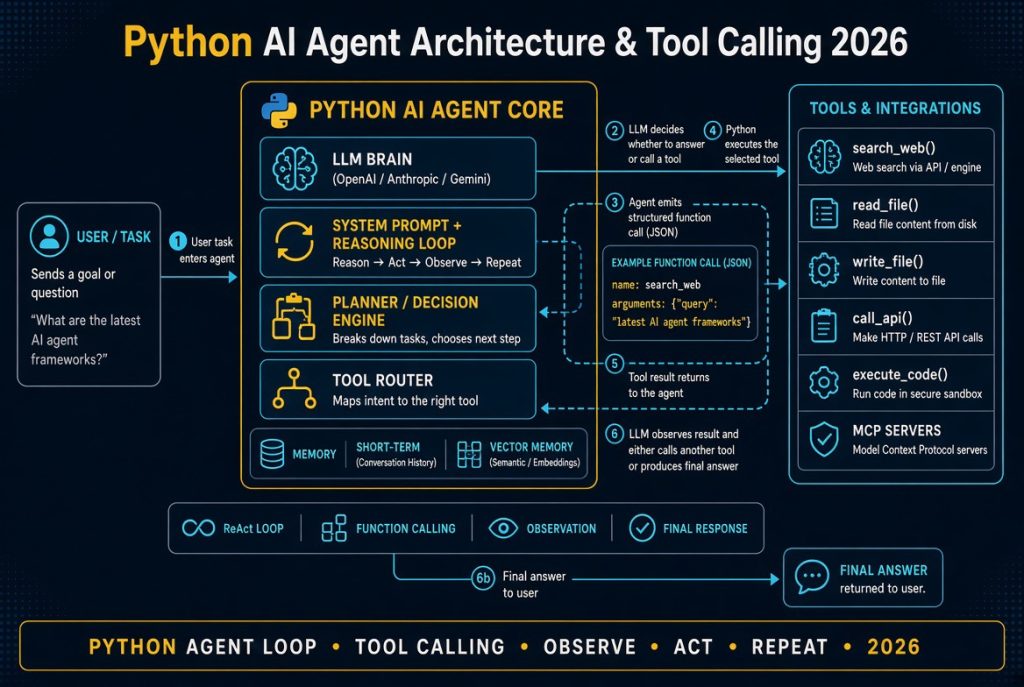
An AI agent is a software system that uses an AI model to interpret a goal, determine what actions may be necessary, use available tools, inspect the results, and continue working until the task reaches an appropriate stopping point.
A simplified agent loop looks like this:
- Receive a goal.
- Understand the task.
- Determine what information or action is required.
- Select an appropriate tool.
- Execute the tool.
- Inspect the result.
- Decide whether more work is necessary.
- Return a result, request approval, or continue the workflow.
The model provides much of the reasoning and language capability, but the agent system provides the surrounding machinery that makes the model useful.
AI Model vs AI Agent
This distinction is fundamental.
An LLM can generate text, analyze information, summarize documents, write code, answer questions, and transform content.
An agent can use an LLM to perform a sequence of actions.
For example:
- LLM: “The server appears to be running out of disk space.”
- Agent: Check disk usage → inspect logs → identify unusually large files → determine whether cleanup is safe → request approval → perform the approved action → verify the result.
The second system requires much more than a model. It needs tools, state, permissions, application logic, validation, error handling, and an execution environment.
That is why agent engineering is fundamentally a software-engineering problem as much as an AI problem.
Why Build AI Agents With Python in 2026?
Python has become one of the most useful languages for AI development because it sits at the intersection of several ecosystems.
A single Python application can communicate with:
- AI model APIs
- REST and GraphQL APIs
- PostgreSQL and other databases
- Cloud platforms
- Object storage
- Search engines
- Vector databases
- Business applications
- Queues and background workers
- Machine-learning libraries
- Automation tools
This is particularly valuable for agents because agents are fundamentally integration-heavy applications.
Consider a customer-support agent.
A useful production version might need to:
- Identify the customer.
- Retrieve the customer’s account.
- Find the relevant order.
- Check shipping information.
- Review previous support tickets.
- Determine the likely issue.
- Draft an appropriate response.
- Escalate the case if necessary.
Python can provide the application layer connecting all those systems.
For developers interested in the broader business use case, see our AI agents for business guide.
The Basic Architecture of a Python AI Agent
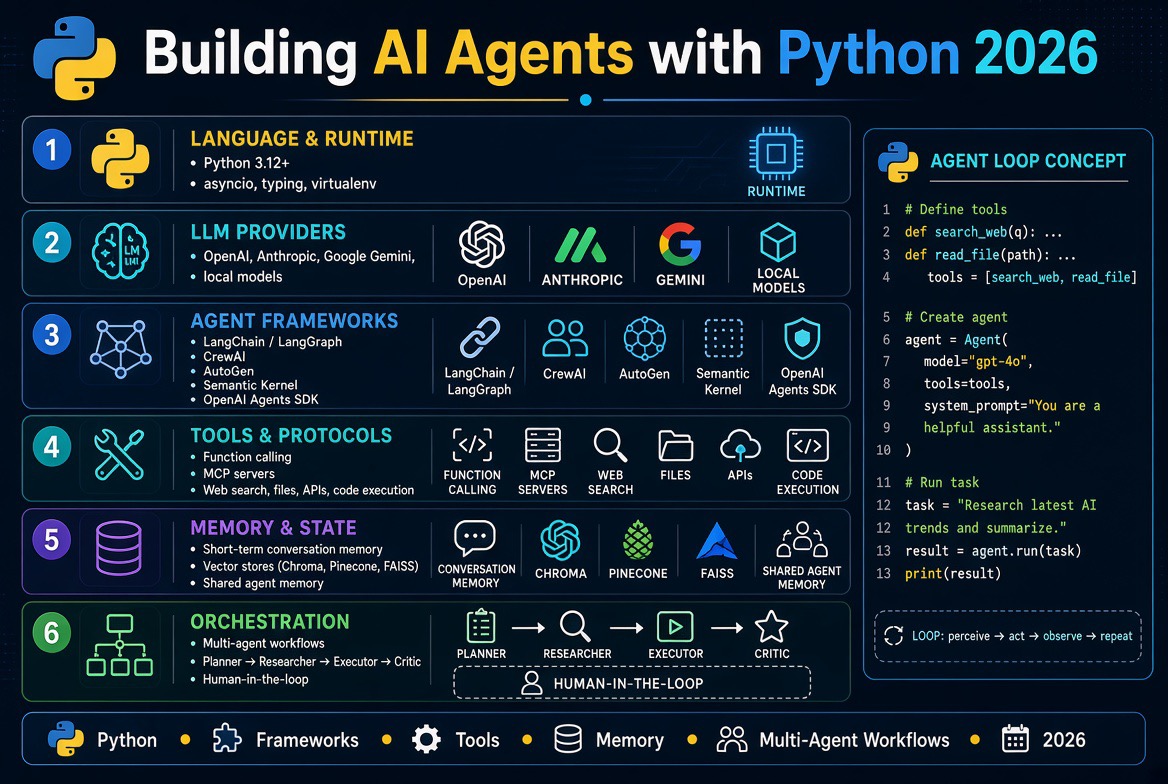
A useful mental model is to think of an AI agent as several layers rather than one program.
| Layer | Purpose |
|---|---|
| Model | Reasoning, language understanding and generation |
| Instructions | Define the agent’s role, rules and boundaries |
| Tools | Give the agent controlled capabilities |
| State | Tracks what has happened during a task |
| Memory | Provides relevant information across interactions |
| Orchestration | Controls the workflow and agent loop |
| Security | Controls identity, permissions and access |
| Observability | Records and explains agent behavior |
| Evaluation | Measures whether the agent actually works |
Beginners often focus almost entirely on the model.
Production engineering requires attention to all of these layers.
What You Need to Build an AI Agent With Python
You do not need a massive technology stack to build your first agent.
A useful starting point contains five components:
- Python application: Controls the workflow.
- AI model: Provides reasoning and language capabilities.
- Tools: Functions or services the agent can invoke.
- Instructions: Define the agent’s purpose and behavior.
- State: Stores information required during execution.
A production agent may additionally require:
- Authentication
- Authorization
- Persistent storage
- Vector search
- Message queues
- Background workers
- Human approval
- Sandboxed execution
- Tracing
- Evaluation pipelines
- Secrets management
- Rate limiting
- Monitoring
Step 1: Set Up a Python Environment
Start with an isolated Python environment rather than installing project dependencies globally.
Python’s built-in venv module is designed specifically for creating isolated virtual environments. The official Python documentation recommends using virtual environments so projects can maintain their own dependencies without interfering with other applications.
Read the official Python venv documentation.
python -m venv .venvActivate it on macOS or Linux:
source .venv/bin/activateOn Windows:
.venv\Scripts\activateThen upgrade your packaging tools:
python -m pip install --upgrade pipFor a real project, keep your dependencies reproducible using an appropriate dependency-management approach. A simple project might begin with requirements.txt, while larger applications may use tools such as Poetry, uv, or another modern Python package manager.
Step 2: Connect Python to an AI Model
The next step is giving your Python application access to a model.
For example, with the OpenAI Python SDK, a basic request can look like this:
from openai import OpenAI
client = OpenAI()
response = client.responses.create(
    model="YOUR_MODEL",
    input="Explain what an AI agent is in simple terms."
)
print(response.output_text)
The exact model you choose will depend on your workload, budget, latency requirements, context needs, and provider.
The important architectural point is that Python is controlling the application while the model provides the reasoning component.
OpenAI’s current API platform combines the Responses API with agent-building capabilities and tools such as web search, file search and remote MCP connections.
Explore the official OpenAI API platform.
Step 3: Define the Agent’s Role
Before adding dozens of tools, define what your agent is actually supposed to accomplish.
A weak instruction might be:
You are a helpful assistant.That is sufficient for a general chatbot, but production agents usually need more explicit boundaries.
For example:
You are an order-support agent.
Your responsibilities:
1. Identify the customer's order.
2. Check the order status using the order lookup tool.
3. Explain the latest status clearly.
4. Never invent shipping information.
5. Never cancel an order without explicit confirmation.
6. Do not access unrelated customer records.
7. Escalate requests outside your permissions.
Good instructions should establish:
- The agent’s purpose
- What it is allowed to do
- What it is not allowed to do
- When it should use tools
- When it should ask for clarification
- When it should request human approval
- When it should stop
One of the biggest mistakes in agent development is expecting the model to infer operational policy that should have been explicitly implemented in application code.
Step 4: Give the Agent Tools
Tools are what allow an AI agent to interact with systems outside the model.
A tool can be as simple as a Python function:
def calculate_total(price: float, quantity: int) -> float:
    return price * quantity
Other tools might:
- Search a database
- Read a document
- Call a REST API
- Check an order
- Search company documentation
- Create a support ticket
- Send an email
- Retrieve analytics
- Check cloud infrastructure
- Run a calculation
The important security principle is:
Do not give the model unrestricted access to your application.
Instead, expose narrowly defined capabilities.
For example, this is risky:
execute_any_sql(query)A safer application-level interface might be:
get_customer_order(customer_id)or:
get_account_balance(account_id)The model can request the capability, but your application remains responsible for enforcing the actual security policy.
Step 5: Understand the Agent Loop
The agent loop is the core concept developers should understand before relying heavily on frameworks.
A simplified workflow looks like this:
User request
      ↓
Python application
      ↓
AI model
      ↓
Does the task require a tool?
      ↓
    Yes
      ↓
Execute approved tool
      ↓
Return tool result to model
      ↓
Does more work need to happen?
      ↓
    Yes → continue
      ↓
Final response
This is what differentiates a tool-using agent from a simple request-response chatbot.
The model can participate in an iterative workflow instead of producing one response and stopping.
Building a Simple AI Agent From Scratch With Python
You can learn a great deal by building a basic agent without a framework first.
Consider this simplified structure:
TOOLS = {
    "calculate_total": calculate_total
}
def run_agent(user_request):
    response = ask_model(
        user_request,
        tools=TOOLS
    )
    while response.requires_tool:
        tool_name = response.tool_name
        arguments = response.arguments
        if tool_name not in TOOLS:
            raise ValueError("Tool is not allowed")
        result = TOOLS[tool_name](**arguments)
        response = ask_model(
            user_request,
            previous_response=response,
            tool_result=result,
            tools=TOOLS
        )
    return response.text
This is intentionally simplified. A production implementation would need much stronger validation, structured tool schemas, authentication, timeouts, retries, logging, limits, error handling, and protection against unsafe actions.
Nevertheless, this small example teaches an important lesson:
The agent is an orchestration loop around a model, not the model itself.
Why Building From Scratch Is Worth Doing
There is a temptation to start immediately with a framework because frameworks make complex systems look easy.
I recommend resisting that temptation for your first serious learning project.
Build one small agent loop yourself.
Understand:
- How tool calls are represented
- How arguments are validated
- How results return to the model
- How state changes between steps
- How failures are handled
- How the agent decides to stop
Once those concepts are clear, frameworks become much easier to evaluate instead of simply becoming abstractions you do not understand.
Step 6: Use an AI Agent Framework
Once your agent becomes more complex, you may not want to implement every orchestration feature yourself.
Popular Python-oriented options in 2026 include:
- OpenAI Agents SDK
- LangChain
- LangGraph
- CrewAI
- Google Agent Development Kit
- Microsoft Agent Framework
Our AI agent frameworks comparison explores these approaches in more detail.
OpenAI Agents SDK
OpenAI’s Agents SDK is designed around agent workflows, tools, handoffs, guardrails and tracing. OpenAI has also expanded the SDK toward long-running tasks and controlled sandbox environments where agents can inspect files, run commands and edit code.
Explore the OpenAI Agents SDK for Python.
Google Agent Development Kit
Google’s Agent Development Kit is an open-source framework for developing and deploying AI agents. Google’s current documentation describes support for Python as well as other languages, tools, evaluation, multi-agent architectures and deployment options.
Explore Google’s Agent Development Kit documentation.
Microsoft Agent Framework
Microsoft’s Agent Framework provides Python support for agents, workflows, tools, conversations, memory, middleware, human-in-the-loop workflows and orchestration.
Explore Microsoft Agent Framework.
LangChain and LangGraph
LangChain remains useful for composing models, tools, retrieval systems and integrations, while LangGraph is particularly relevant when developers need more explicit control over stateful and graph-based agent workflows.
The important point is not to select a framework because it is popular.
Select it because it solves a problem your application actually has.
When Should You Use an Agent Framework?
A framework may be unnecessary for:
request → model → one tool → responsePlain Python plus an SDK can be perfectly reasonable here.
A framework becomes more attractive when you have:
- Multiple tools
- Multiple agents
- Long-running workflows
- Human approval steps
- Persistent state
- Retries
- Complex routing
- Tool permissions
- Tracing
- Evaluation
- Background execution
In other words, complexity should justify the framework.
Step 7: Add State to Your Python Agent
Agents often need to know what has already happened.
Consider an order-support workflow.
The agent might need to remember:
state = {
    "customer_id": "12345",
    "order_id": "ORD-1001",
    "status_checked": True,
    "refund_requested": False,
    "human_approval_required": True
}
This is different from simply storing the conversation transcript.
Conversation history is one type of context.
Application state represents the structured status of a workflow.
That distinction becomes increasingly important as tasks become longer.
Step 8: Add Memory
Memory is often used loosely in AI discussions, but there are several different concepts.
Short-Term Memory
Information required within the current interaction or task.
Long-Term Memory
Information stored for possible use across future interactions.
Task State
Structured information describing what has happened during an ongoing workflow.
Retrieval-Based Memory
Relevant information can be stored in a searchable database or vector store and retrieved when needed.
Do not assume that more memory automatically makes an agent better.
Uncontrolled memory can create privacy problems, stale information, unnecessary context, and unpredictable behavior.
Good memory design asks:
- What should be remembered?
- For how long?
- Who is allowed to access it?
- How is stale information removed?
- How is sensitive information protected?
Step 9: Connect Your Python Agent to Databases
Database access can make agents extremely useful.
It can also make them dangerous.
A common beginner mistake is giving a model unrestricted SQL access to a production database.
Instead, expose controlled application functions.
def get_customer_order(customer_id):
    # Validate identity and authorization.
    # Query only permitted records.
    # Return structured data.
    pass
This architecture allows your application to enforce rules independently of what the model asks for.
For sensitive systems, also consider:
- Read-only database credentials
- Separate service accounts
- Row-level authorization
- Query limits
- Timeouts
- Audit logging
- Data masking
- Network restrictions
Step 10: Give Agents Access to External APIs
Python is especially useful for API-connected agents.
Imagine a sales agent with access to:
- CRM APIs
- Customer databases
- Email APIs
- Calendar APIs
- Product information
- Analytics systems
A user could ask:
“Find customers who have not purchased anything in the last six months, identify the highest-value accounts, and prepare follow-up messages.”
The agent might:
- Query the CRM.
- Filter customers.
- Calculate account value.
- Rank the accounts.
- Generate personalized drafts.
- Present the drafts for approval.
Notice the final step.
There is a significant difference between drafting an email and sending an email.
The first may be low risk.
The second creates an external side effect.
That distinction should influence your architecture.
Step 11: Add Human Approval for High-Impact Actions
One of the most useful principles in agent development is:
Do not make every action autonomous simply because you can.
Reading information is generally lower risk than changing information.
Drafting a message is generally lower risk than sending it.
Preparing a payment is lower risk than executing it.
Creating a deployment plan is lower risk than deploying directly to production.
A safer workflow can look like:
Agent proposes action
        ↓
Application validates request
        ↓
Policy checks permissions
        ↓
Human approves
        ↓
Python executes action
        ↓
Result is recorded
        ↓
Agent continues or finishes
This is often called human-in-the-loop.
It does not mean an agent is incapable of autonomy. It means autonomy is proportional to risk.
Step 12: Implement Tool Permissions
Tool access should be treated as an authorization problem.
Suppose an agent has these tools:
read_customerupdate_customersend_emaildelete_customerissue_refund
It may be unnecessary for one agent to have all five.
A customer-support information agent may need only:
read_customerread_order
A refund agent might additionally need issue_refund, but with transaction limits and approval requirements.
This is the principle of least privilege.
Every agent should have the minimum authority required for its job.
Security When Building AI Agents With Python
AI agents introduce security considerations beyond ordinary chatbot applications because they can interact with external systems.
OWASP’s Top 10 for Agentic Applications 2026 provides a useful security framework for developers working with autonomous and agentic systems.
Common risks include:
- Prompt injection
- Sensitive information disclosure
- Excessive permissions
- Tool misuse
- Credential exposure
- Malicious external content
- Supply-chain vulnerabilities
- Unsafe autonomous actions
- Insecure agent-to-agent communication
- Insufficient monitoring
For Python applications specifically:
- Never hard-code API keys.
- Use environment variables or a dedicated secrets manager.
- Validate tool arguments.
- Authenticate external requests.
- Apply least-privilege credentials.
- Use timeouts on network operations.
- Rate-limit expensive operations.
- Separate development and production credentials.
- Sandbox code execution when appropriate.
- Log security-sensitive actions.
Our dedicated AI agent security risks guide covers the threat landscape in considerably more depth.
Prompt Injection and Python Agents
Prompt injection deserves special attention because an agent may consume information that was not written by the person who configured the agent.
For example, an agent might read:
- An email
- A web page
- A PDF
- A support ticket
- A GitHub issue
- A customer message
- A database record
That external content could contain instructions designed to influence the model.
The application therefore needs to distinguish between:
trusted instructions and untrusted data.
Do not assume that because information came through a tool it is trustworthy.
Step 13: Handle Errors Properly
Agents interact with systems that fail.
APIs time out.
Databases become unavailable.
Authentication tokens expire.
External services return invalid responses.
Models make incorrect decisions.
A production agent needs explicit failure handling.
try:
    result = call_external_tool()
except TimeoutError:
    result = {
        "success": False,
        "error": "The service timed out."
    }
except Exception:
    result = {
        "success": False,
        "error": "The tool failed."
    }
But error handling should go beyond catching exceptions.
Consider:
- Retries with limits
- Exponential backoff
- Timeouts
- Circuit breakers
- Fallback tools
- Clear failure states
- Human escalation
- Idempotency for write operations
Agents should also have a maximum number of steps or a budget so a reasoning loop cannot continue indefinitely.
Step 14: Add Observability and Tracing
Traditional applications usually make their execution path relatively easy to understand.
Agents are different.
The same user request can potentially produce different tool calls and different execution paths.
That makes observability essential.
You should ideally be able to determine:
- Which user initiated the task?
- Which model was used?
- What tools were available?
- Which tools were called?
- What arguments were supplied?
- What results came back?
- How long did each step take?
- What failed?
- How many model calls occurred?
- How much did the workflow cost?
- Why did the agent stop?
OpenAI’s current agent tooling, for example, includes tracing as part of its agent-development stack, while other frameworks provide their own observability mechanisms.
Do not log secrets, authentication tokens, passwords or unnecessary personal information simply because you are trying to improve observability.
Step 15: Evaluate Your Python AI Agent
Traditional unit tests remain important, but they are not enough for agentic applications.
An agent may use different tools or take different paths for similar requests.
Therefore, evaluate both the final answer and the trajectory that produced it.
Useful evaluation questions include:
- Did the agent choose the correct tool?
- Did it use valid arguments?
- Did it follow authorization rules?
- Did it hallucinate information?
- Did it stop when the task was complete?
- Did it recover from tool failures?
- Did it request approval when required?
- Did it expose sensitive data?
- Did it waste unnecessary model or API calls?
Test More Than Happy Paths
Do not test only:
“User asks normal question → agent gives correct answer.”
Also test:
- Missing database records
- Invalid user IDs
- Tool timeouts
- Malformed API responses
- Unauthorized requests
- Conflicting instructions
- Prompt injection
- Very long inputs
- Repeated requests
- Unexpected tool results
The goal is not to prove that the agent never fails.
The goal is to make failures predictable, detectable and contained.
Step 16: Add Retrieval-Augmented Generation
Many useful agents need access to information that is not contained in the model’s training data or context.
This is where retrieval-augmented generation, commonly called RAG, becomes useful.
A simplified RAG workflow is:
- User asks a question.
- Python converts the request into a search query.
- The application searches an approved knowledge source.
- Relevant documents are retrieved.
- The relevant content is supplied to the model.
- The agent produces an answer grounded in the retrieved information.
For an enterprise agent, the knowledge source might contain:
- Internal documentation
- Product manuals
- Policies
- Support articles
- Technical documentation
- Contracts
- Knowledge-base articles
RAG does not automatically make an agent accurate.
Retrieval quality matters.
Access control matters.
Document freshness matters.
And the agent should not retrieve documents that the requesting user is not authorized to access.
Step 17: Use MCP for Tool and Data Connectivity
The Model Context Protocol (MCP) has become an important part of the agent ecosystem because it provides a standardized way for AI applications to connect with tools and data.
For Python developers, this can reduce the amount of custom integration work required when connecting agents to external capabilities.
However, MCP should not be treated as a security boundary by itself.
Developers still need to evaluate:
- Which MCP servers are trusted?
- Which tools are exposed?
- What credentials are used?
- What data can be accessed?
- What actions can be performed?
- How are calls logged?
Read our complete MCP (Model Context Protocol) explained guide.
Explore the official Model Context Protocol documentation.
Step 18: Build Multi-Agent Systems Carefully
Once developers discover agents, there is a natural temptation to create multiple agents.
One agent handles research.
Another handles analysis.
Another writes the final report.
Another verifies the result.
This can work, but multi-agent systems introduce additional complexity.
Each agent needs a defined role.
Each agent may need its own permissions.
Communication between agents becomes another trust boundary.
Consider:
Research Agent
      ↓
Analysis Agent
      ↓
Review Agent
      ↓
Report Agent
If the research agent produces malicious or incorrect information, the other agents need ways to detect or constrain it.
Do not assume that one trusted agent automatically makes every downstream request trustworthy.
Our multi-agent systems guide explores this architecture in greater depth.
You can also read our guide to agent-to-agent communication.
When Should You Build a Multi-Agent System?
Use multiple agents when specialization genuinely improves the system.
Good reasons include:
- Different agents require different tools.
- Different responsibilities need different permissions.
- The workflow naturally contains independent roles.
- Specialized agents can be evaluated separately.
- Different teams own different capabilities.
Do not use multiple agents simply because the architecture looks more advanced.
A reliable single agent is better than an unnecessarily complicated team of unreliable agents.
Step 19: Deploy a Python AI Agent
Development and production are very different environments.
A local agent might run as:
python main.pyA production agent may need:
- Containerization
- HTTPS
- Authentication
- Secrets management
- Background workers
- Queues
- Database connections
- Monitoring
- Logging
- Rate limiting
- Autoscaling
- Health checks
Python agents can be deployed using traditional servers, containers, Kubernetes, serverless platforms, cloud runtimes, or managed agent services.
The right deployment model depends on whether your agent is interactive, asynchronous, long-running, resource-intensive, or connected to sensitive infrastructure.
Interactive vs Background Agents
Not every agent should run inside the HTTP request that triggered it.
A simple support assistant might respond within seconds.
A research agent might need several minutes.
A coding agent might run for much longer.
For longer workflows, a better architecture can be:
User
 ↓
API
 ↓
Job Queue
 ↓
Agent Worker
 ↓
Tools / APIs / Database
 ↓
Result Store
 ↓
Notification
This architecture makes retries, monitoring and long-running execution easier to manage.
Step 20: Secure Your Secrets
Never put API keys directly into source code.
A simple development configuration may use environment variables:
import os
API_KEY = os.environ["OPENAI_API_KEY"]
For production, use a dedicated secrets-management system appropriate to your infrastructure.
Also remember that secrets can leak through:
- Source code
- Git repositories
- Logs
- Error messages
- Prompts
- Tool responses
- Agent memory
- Debugging output
Secret management is therefore not simply a matter of hiding environment variables.
Step 21: Control Agent Costs
Agentic workflows can cost considerably more than simple model calls.
A single task might involve:
- Initial model call
- Search call
- Database query
- Second model call
- Tool execution
- Third model call
- Final response
Therefore, monitor:
- Number of model calls
- Token usage
- Tool calls
- Execution time
- External API costs
- Retries
- Failed workflows
The useful business metric is often not cost per model call.
It is cost per successfully completed task.
An inexpensive model that repeatedly fails may ultimately be more expensive than a stronger model that completes the workflow reliably on the first attempt.
Step 22: Add Rate Limits and Execution Budgets
An agent should not be able to continue indefinitely.
Set limits such as:
- Maximum number of tool calls
- Maximum execution time
- Maximum model calls
- Maximum API requests
- Maximum financial transaction amount
- Maximum data retrieved
For example:
MAX_STEPS = 20
for step in range(MAX_STEPS):
    result = run_agent_step()
    if result.is_complete:
        break
else:
    raise RuntimeError("Agent exceeded maximum workflow steps")
This type of deterministic boundary is extremely important.
Never assume the model will always decide to stop correctly.
Common Mistakes When Building AI Agents With Python
1. Giving the Agent Too Much Authority
More tools do not automatically produce a better agent.
Every additional capability increases the potential attack surface and the number of ways the system can fail.
2. Using AI for Deterministic Tasks
If a task can be handled reliably by ordinary Python code, use ordinary Python code.
For example:
total = price * quantityThere is little reason to ask an LLM to perform a calculation that Python can perform deterministically.
AI should be used where interpretation, ambiguity, planning or reasoning adds genuine value.
3. Skipping Observability
If you cannot see which tools an agent called and what happened afterward, production debugging becomes extremely difficult.
4. Ignoring Failure Handling
Real systems fail. Build for failure rather than assuming every API call will succeed.
5. Treating Prompts as Security Controls
A sentence such as “Never delete customer records” is useful instruction, but it should not be your only protection against deletion.
The application should also make sure the agent does not have unnecessary deletion privileges.
6. Building a Multi-Agent System Too Early
Multi-agent architectures can be useful, but they also introduce communication, orchestration and security complexity.
7. Failing to Test Adversarial Inputs
Agents consume external information. That information should be treated as potentially untrusted.
Our Take: The Hardest Part of Agent Development Is Not the Model
This is one of the most important lessons we would emphasize to developers entering agent development in 2026.
The demo is usually easy.
The production system is not.
Getting a model to call a weather function is relatively straightforward.
Building an agent that can safely operate against a company’s CRM, financial system, email platform and internal database is a very different engineering challenge.
The difficult questions become:
- What if the tool returns bad data?
- What if the user is not authorized?
- What if the model calls the wrong tool?
- What if an external document contains malicious instructions?
- What if the API times out?
- What if the agent loops?
- What if the agent exposes sensitive information?
- What if the model provider is unavailable?
- What if the cost suddenly increases?
- How do we reconstruct what happened after an incident?
That is why our recommendation is to think of an AI agent as a software system with an AI reasoning component, rather than thinking of it as an AI model with some tools attached.
A Practical Python AI Agent Project for Beginners
If you want to learn agent development, build something small enough to finish.
A good first project is a research assistant agent.
Give it three controlled tools:
- Web search
- Document retrieval
- Basic calculation
Give it a task such as:
“Research the latest developments in a technology, compare three companies, calculate the percentage difference between selected figures, and produce a short report.”
Then progressively add complexity.
Version 1
One model and one tool.
Version 2
Multiple tools.
Version 3
Structured state.
Version 4
Persistent memory.
Version 5
Authentication and permissions.
Version 6
Human approval.
Version 7
Tracing and evaluation.
Version 8
Background execution and production deployment.
This progression teaches considerably more than immediately building a complicated multi-agent system.
Recommended Learning Path for Building AI Agents With Python
If you are new to agent development, follow this progression:
- Learn Python fundamentals.
- Learn HTTP, REST APIs and JSON.
- Learn environment variables and secrets management.
- Connect Python to an LLM.
- Learn structured outputs and tool calling.
- Build a simple agent loop.
- Add state and memory.
- Connect databases and APIs.
- Learn an agent framework.
- Implement authentication and permissions.
- Add evaluation and observability.
- Learn multi-agent patterns.
- Deploy the agent.
- Perform security testing.
This sequence is more useful than jumping directly into an advanced framework without understanding the underlying architecture.
Python AI Agents and the Future of Software Development
AI agents are likely to become an increasingly common layer inside ordinary software.
Instead of a separate chatbot sitting beside an application, agents will increasingly operate inside workflows.
Examples include:
- Developer assistants that inspect repositories and create changes
- Customer-support agents that investigate tickets
- Financial agents that prepare reports
- DevOps agents that investigate infrastructure problems
- Security agents that analyze alerts
- Sales agents that research accounts
- Research agents that gather and synthesize information
- Business agents that coordinate repetitive workflows
Python is well positioned for this transition because it can connect AI models with the existing software infrastructure underneath these workflows.
AI Agents, MCP and Interoperability
The next stage of agent development will not necessarily involve every agent being built as a completely isolated application.
Interoperability is becoming increasingly important.
MCP provides a standardized approach for connecting AI applications to tools and data, while agent-to-agent protocols can help specialized agents communicate across system boundaries.
This means a Python agent could eventually become one component inside a much larger ecosystem.
For example:
Customer Agent
      ↓
Finance Agent
      ↓
Payment Tool
      ↓
Banking API
Each layer can have different permissions and security policies.
That architecture makes identity and authorization especially important.
AI Agent Security Checklist for Python Developers
Before putting an agent into production, verify the following:
- API keys are not hard-coded.
- Secrets are stored securely.
- Agent permissions follow least privilege.
- Tool arguments are validated.
- External API responses are treated as untrusted data.
- Database access is restricted.
- Write operations have appropriate authorization.
- High-impact actions require approval where appropriate.
- Execution has time and step limits.
- Retries are bounded.
- Important actions are logged.
- Sensitive information is protected in logs.
- Prompt-injection scenarios have been tested.
- Agent behavior is evaluated using representative tasks.
- Tool failures have defined recovery paths.
- Production and development credentials are separated.
- The system can be disabled quickly if necessary.
AI Agent Frameworks and Development Resources
As your projects become more advanced, these resources can help you go deeper:
- AI Agent Frameworks Comparison
- AI Agent Development Tools
- AI Agents for Business
- AI Agent Security Risks
- MCP (Model Context Protocol) Explained
- Agent-to-Agent Communication
- Multi-Agent Systems
- AI Tools for Developers in 2026
- DevOps Automation Tools
Official AI Agent Development Resources
- OpenAI API and agent platform
- OpenAI Agents SDK for Python
- Google Agent Development Kit documentation
- Microsoft Agent Framework documentation
- Model Context Protocol documentation
- Python virtual environments documentation
- OWASP Top 10 for Agentic Applications 2026
Final Thoughts
Building AI agents with Python is not about creating a magical autonomous program and hoping the model figures everything out.
The strongest agents are carefully engineered software systems.
Python handles the application logic.
The model provides reasoning and language capabilities.
Tools provide access to external capabilities.
State tracks the workflow.
Memory provides relevant context.
Security controls what the agent is allowed to access.
Human approval provides a boundary for high-impact actions.
Observability shows developers what actually happened.
Evaluation determines whether the agent genuinely works.
Once you understand those pieces, agent development becomes considerably less mysterious.
Start with one model, one agent and a few well-defined tools.
Make that system reliable.
Then add complexity only when the problem actually requires it.
That approach is much more likely to turn an impressive AI demo into software that people can genuinely depend on.
Frequently Asked Questions
Can I build an AI agent with Python?
Yes. Python can connect AI models with tools, APIs, databases, files, automation systems and other software components required to create AI agents. Python’s broad ecosystem makes it particularly suitable for integration-heavy agent applications.
Do I need an AI agent framework to use Python?
No. A simple agent can be built directly with Python and an AI provider’s SDK. Frameworks become more useful when workflows require multiple tools, state, orchestration, tracing, handoffs, human approval or multiple agents.
What Python libraries are used for AI agents?
Popular choices include model-provider SDKs, OpenAI Agents SDK, LangChain, LangGraph, CrewAI, Google Agent Development Kit and Microsoft Agent Framework. The best choice depends on the application’s requirements rather than popularity alone.
Can Python AI agents access databases?
Yes. Python agents can interact with databases through controlled application functions. Developers should avoid giving language models unrestricted access to production databases and should instead use least-privilege credentials, authorization checks and narrowly defined database operations.
Can Python agents call APIs?
Yes. Python’s HTTP ecosystem makes it straightforward to connect agents to REST APIs, GraphQL services and internal business systems. API calls should still be authenticated, validated, rate-limited and restricted according to the agent’s permissions.
Are Python AI agents safe?
Python itself does not make an AI agent safe or unsafe. Safety depends on the architecture. Developers should use least-privilege permissions, authentication, input validation, secure secrets management, monitoring, sandboxing where appropriate, bounded execution and human approval for high-impact operations.
What is the difference between an AI agent and a chatbot?
A chatbot primarily responds to user input, while an agent can pursue a goal by selecting tools, performing actions, inspecting results and continuing a workflow. The distinction is not absolute, but tool use, state, orchestration and autonomous action are common characteristics of agentic systems.
Should I build an AI agent from scratch or use a framework?
Build a small agent from scratch when you are learning the architecture or have a simple workflow. Use a framework when you need features such as complex orchestration, multiple agents, persistent state, tracing, evaluation, human-in-the-loop workflows or large numbers of tools.

Leave a reply