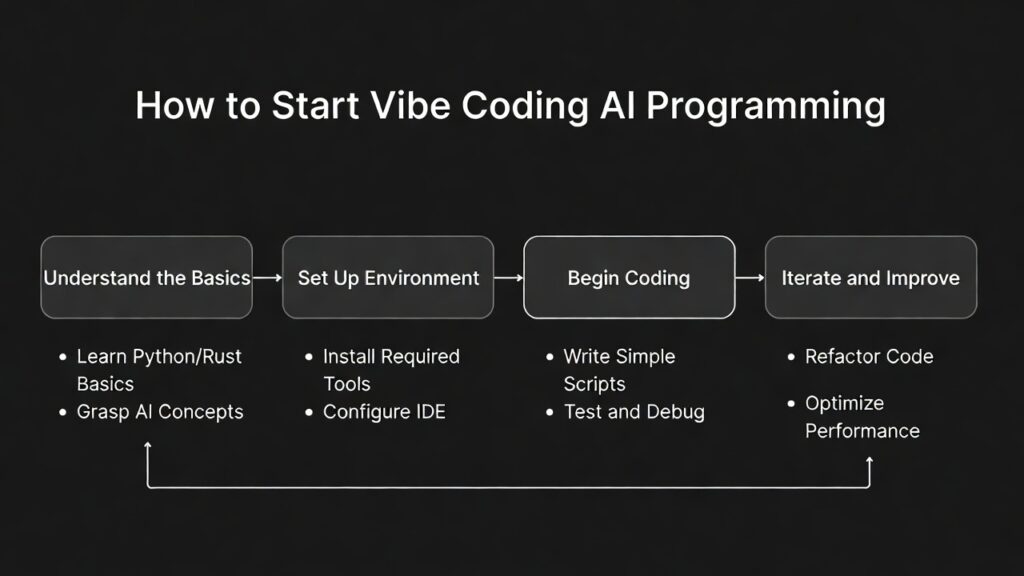
How to Start Vibe Coding: Beginner Guide to AI-Assisted Development (2026)
Learning how to start vibe coding is one of the fastest ways to enter modern software development. With the rise of AI-powered tools, developers no longer need to write every line of code manually. Instead, they can describe what they want using natural language and let AI generate the code.
This new approach is transforming how applications are built, making development faster, more accessible, and more efficient. Whether you are a beginner or an experienced developer, understanding how to start vibe coding can give you a strong advantage.

how to start vibe coding AI programming guide 2026
To understand the bigger picture, read our
complete vibe coding guide.
How to Start Vibe Coding: Understanding the Basics
Before diving into tools and prompts, it is important to understand what vibe coding actually means. Vibe coding is a development approach where you communicate your ideas to AI tools using natural language, and the AI generates the code for you.
Instead of focusing on syntax, you focus on logic, structure, and desired outcomes. The AI handles implementation, while you review and refine the results.
This shift makes development more about problem-solving and less about memorizing syntax.
How to Start Vibe Coding: Step 1 Learn Basic Programming
Even though AI tools can generate code, having a basic understanding of programming is essential. You should learn:
- variables and data types
- functions and logic
- loops and conditions
- basic debugging techniques
These fundamentals help you understand AI-generated code and fix issues when they arise.
To build a strong foundation, explore our
AI developer skills 2026 guide.
How to Start Vibe Coding: Step 2 Choose the Right AI Tools
Choosing the right tools is a critical step when learning how to start vibe coding. Some of the most popular AI coding tools include:
These tools integrate with popular IDEs and provide real-time code suggestions, autocomplete features, and AI-generated functions.
You can also explore official platforms:
Compare tools in our
AI coding assistant comparison.
How to Start Vibe Coding: Step 3 Practice Prompt Writing
Prompt writing is the core skill in vibe coding. The better your prompts, the better your results.
Start with simple instructions like:
“Build a login page with validation using HTML, CSS, and JavaScript”
As you improve, add more details:
“Create a responsive login page using React with form validation, error handling, and API integration”
Clear, detailed prompts produce higher-quality code.
To master this skill, read our
best prompts for vibe coding guide.
How to Start Vibe Coding: Step 4 Review and Edit AI Code
AI-generated code is not always perfect. Developers must review and refine the output to ensure quality.
- check for logical errors
- optimize performance
- ensure security best practices
- test all features thoroughly
Learning how to debug and improve code is essential for long-term success.
Avoid common pitfalls in our
AI coding mistakes beginners make guide.
How to Start Vibe Coding: Step 5 Build Real Projects
The best way to learn how to start vibe coding is by building real projects. Start small and gradually increase complexity.
- build a to-do list application
- create a simple blog website
- develop a REST API
- build a full-stack web app
Projects help you understand how AI tools work in real-world scenarios.
Explore ideas in our
vibe coding projects guide.
How to Start Vibe Coding: Best Practices for Success
To get the most out of vibe coding, follow these best practices:
- write clear and structured prompts
- break complex tasks into smaller steps
- review all generated code
- keep learning programming fundamentals
Consistency and practice are key to mastering AI-assisted development.
How to Start Vibe Coding: Challenges to Expect
While vibe coding is powerful, it comes with challenges:
- AI-generated code may contain bugs
- requires debugging and testing skills
- over-reliance can slow learning
Understanding these challenges helps you use AI tools more effectively.
How to Start Vibe Coding: The Future of AI Development
The future of software development is increasingly AI-driven. Developers who learn how to start vibe coding now will be better prepared for this shift.
AI tools will continue to improve, enabling faster development, smarter debugging, and more advanced automation.
To stay ahead, explore our
best AI developer tools 2026 guide.
Conclusion
Learning how to start vibe coding is a valuable skill for modern developers. By combining programming fundamentals with AI tools, you can build applications faster and more efficiently.
The key is to practice consistently, refine your prompts, and always review AI-generated code.
FAQ
What is vibe coding?
Vibe coding is a development approach where developers use natural language prompts to generate code with AI tools.
How do I start vibe coding as a beginner?
Start by learning basic programming, choosing an AI tool, practicing prompts, reviewing code, and building small projects.
Do I need coding experience for vibe coding?
Basic programming knowledge is recommended to understand and debug AI-generated code effectively.
Which tools are best for vibe coding?
Popular tools include GitHub Copilot, Codeium, and Tabnine, which provide AI-assisted coding features.

Leave a reply