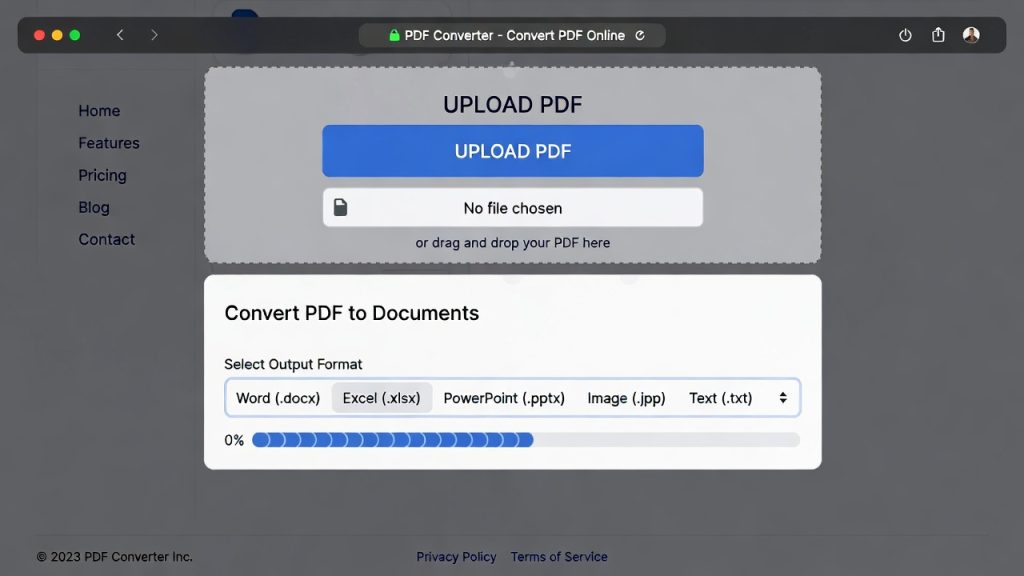
How to Convert PDF to Documents Online for Free (No Account Required)
Introduction
Convert pdf to documents online has become a core workflow for students, remote workers, and small businesses in 2026. Whether you need Word, Excel, or PowerPoint versions of your PDF files, modern browser tools make the process fast, free, and account-free.
In this step-by-step guide, you’ll learn how to convert PDFs quickly using PDFImageTools and similar lightweight browser-based platforms.

Convert PDF to Word Online Free
Why Convert PDF to Documents Online?
PDFs are great for sharing finalized files, but editing them directly is difficult. Common scenarios include:
Editing submitted assignments
Updating project reports
Extracting tables for spreadsheets
Reusing slides from presentations
Online conversion tools allow you to get editable documents instantly, without installing software or paying for subscriptions.
Step-by-Step: Convert PDF to Word/Excel/PPT
Follow these simple steps to convert PDFs online:
Step 1: Open a Trusted Online Converter
Use a browser-first tool that supports multiple formats:
PDF → Word
PDF → Excel
PDF → PowerPoint
👉 https://pdfimagetools.app/pdf-to-word
👉 https://pdfimagetools.app/pdf-to-excel
👉 https://pdfimagetools.app/pdf-to-ppt
Step 2: Upload Your PDF
Click Upload File and select your PDF.
Tips:
Ensure the PDF contains clear formatting
Multiple files can be converted one at a time
Works on both desktop and mobile browsers
Step 3: Choose Conversion Format
Select the target document type:
Word (.docx) → editable text and formatting
Excel (.xlsx) → tables and charts
PowerPoint (.pptx) → slides and layouts
Step 4: Convert the File
Click Convert. Processing time is usually a few seconds for standard documents.
PDFImageTools handles this without requiring registration, saving time compared to AI or desktop tools.
Step 5: Download the Converted Document
After conversion:
Download the editable document
Open in Word, Excel, or PowerPoint
Make edits, share, or submit
Browser-based tools ensure minimal loss of formatting during conversion.
Real Use Case Examples
Scenario 1: Student converting lecture notes PDF to Word for editing.
Scenario 2: Freelancer extracting tables from invoices for Excel reports.
Scenario 3: Team member reusing slides from a PDF for a presentation deck.
All conversions are completed without software installation and in under two minutes.
Advantages of Online PDF Conversion Tools
No installation required
Works on any device (Windows, Mac, iPhone, Android)
Free access without account
Fast and reliable
Privacy-focused with temporary processing
PDFImageTools provides all of these advantages in one lightweight package.
Tips for Better Conversions
Ensure PDFs are not scanned images (use OCR-enabled tools if needed)
Keep original formatting simple for best results
Security & Privacy
When converting PDFs online:
Choose HTTPS-enabled platforms
Ensure automatic file deletion after conversion
Avoid tools requesting unnecessary permissions
PDFImageTools prioritizes privacy by processing files in-browser when possible and deleting them automatically after download.
Workflow Recommendations for 2026
| Task | Recommended Tool |
|---|---|
| Quick Word conversion | PDFImageTools PDF → Word |
| Extract tables | PDFImageTools PDF → Excel |
| Reuse slides | PDFImageTools PDF → PowerPoint |
For most remote workers, students, and freelancers, browser-first conversion is faster, safer, and more convenient than traditional software or AI-based tools.
Future Trends: PDF to Document Conversion
AI-assisted layout preservation
OCR integration for scanned documents
Browser-only, privacy-first processing
Faster batch conversion
While AI tools enhance document intelligence, browser-first lightweight tools remain fastest for everyday conversions.
Conclusion
Converting PDFs to editable documents no longer requires expensive software. With browser-based tools like PDFImageTools, users can convert PDF to documents online for free, with no account required, in seconds.
This workflow is essential for students, remote workers, and small business professionals who need speed, simplicity, and privacy.
About the Author
This article references tools tested by our editorial team at PDFImageTools, focusing on speed, usability, and privacy-first workflows for PDF-to-document conversions.
Related Reading:
• AI Replacing Software Developers
• AI Developer Skills 2026
• AI Tools Transforming Software Jobs
• Enterprise AI Adoption

Leave a reply