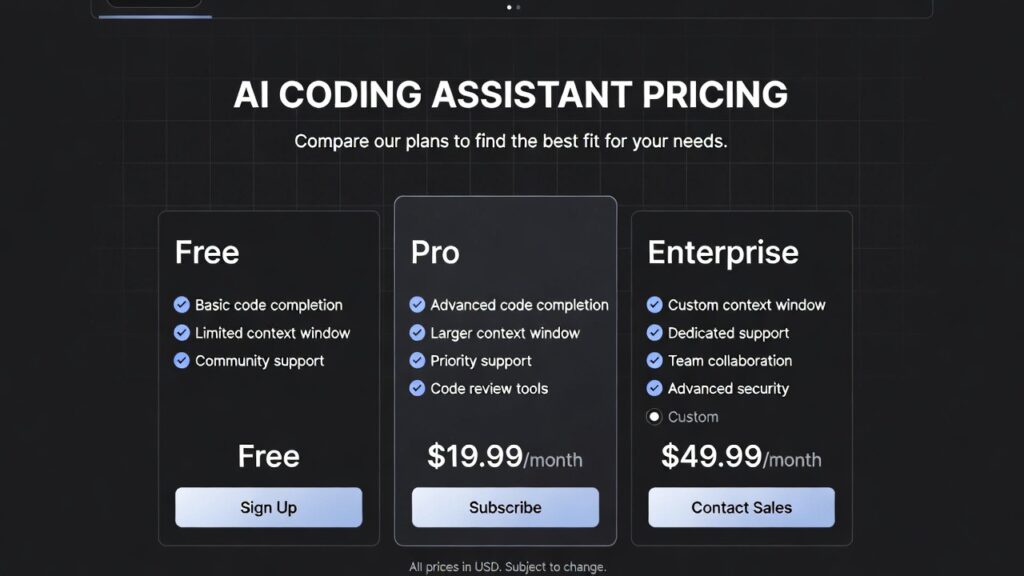
AI Coding Assistant Pricing Guide (2026 Cost Comparison)
AI coding assistant pricing is an important factor for developers choosing the right tools to improve productivity without overspending.
In this guide, we compare the cost of popular AI coding assistants and explain what you get at different pricing levels.

To understand how these tools fit into your career, read our
AI developer skills 2026.
What Affects AI Coding Assistant Pricing
AI coding assistant pricing varies based on several factors including features, usage limits, and level of AI capabilities.
- code generation quality
- AI model capabilities
- team collaboration features
- enterprise security options
Premium tools typically offer more accurate suggestions, better integrations, and advanced features such as AI chat assistants.
AI Coding Assistant Pricing Comparison
| Tool | Free Plan | Paid Plan | Best For |
|---|---|---|---|
| GitHub Copilot | No | ~$10/month | Professional developers |
| Codeium | Yes | Optional | Beginners |
| Tabnine | Yes | ~$12/month | Teams and privacy |
For a full comparison of features, visit our
AI coding assistant comparison.
Free vs Paid AI Coding Tools
Free AI coding tools provide basic functionality such as autocomplete and limited AI assistance.
Paid tools offer:
- more accurate suggestions
- advanced AI models
- priority performance
- team collaboration features
Developers should evaluate whether the productivity gains from paid tools justify the cost.
Which AI Coding Assistant Is Worth the Cost
Choosing the best tool depends on your budget and development needs.
GitHub Copilot is ideal for developers who want high accuracy and are willing to pay for premium features. Codeium is perfect for those who want a free solution with strong performance. Tabnine is suitable for teams that prioritize privacy and collaboration.
To explore more tools, see our
best AI developer tools 2026.
Cost vs Value Analysis
When evaluating AI coding assistant pricing, it is important to consider the value these tools provide rather than just the cost. Developers using AI tools often report significant time savings, which can translate into higher productivity and faster project completion.
For professional developers, even a small monthly subscription can be justified if it reduces development time and increases output quality.
For beginners, starting with free tools and upgrading later is often the best strategy.
Download Free AI Developer Roadmap
Want to accelerate your AI career? Download our free AI Developer Roadmap 2026 and learn the exact skills and tools used by professionals.
Prefer direct download?
Click here to download instantly
.
Official Tool Pricing Pages
Enterprise AI Coding Assistant Pricing
Enterprise AI coding assistant pricing is typically customized based on team size, usage, and security requirements. Companies often pay higher fees for advanced features such as private model hosting, compliance support, and integration with internal systems. These enterprise solutions are designed for organizations that require high levels of security, scalability, and performance.
Another important aspect of AI coding assistant pricing is scalability. Many tools offer different pricing tiers depending on usage, which is especially relevant for teams and organizations. Individual developers may only need basic features, while larger teams often require advanced collaboration tools, API access, and enterprise-grade security. As a result, pricing can increase significantly for enterprise plans, but these features are essential for companies building large-scale applications.
Subscription flexibility is also becoming a key factor in pricing models. Some AI coding tools now offer pay-as-you-go options or usage-based billing, allowing developers to pay only for what they use. This model is particularly useful for freelancers or part-time developers who may not need continuous access to premium features. It also lowers the barrier to entry for developers who want to experiment with AI tools before committing to a monthly subscription.
Another consideration when evaluating AI coding assistant pricing is long-term value. While free tools provide a great starting point, they often come with limitations such as reduced accuracy, fewer integrations, or restricted usage. Paid tools, on the other hand, continuously improve through updates, better AI models, and enhanced performance. Over time, these improvements can lead to significant productivity gains, making the investment worthwhile for serious developers.
Developers should also consider how AI coding tools impact learning and skill development. While these tools can accelerate coding speed, relying too heavily on them without understanding the underlying logic can slow down skill growth. The best approach is to use AI assistants as learning companions—reviewing suggestions, understanding generated code, and gradually improving programming skills. This balanced approach ensures developers gain both productivity and expertise.
Conclusion
This AI coding assistant pricing guide shows that there are options available for every budget, from free tools to premium subscriptions.
Choosing the right tool depends on your needs, experience level, and how much value you place on productivity gains.
Developers who invest in the right tools can significantly improve their workflow and efficiency.
FAQ
How much do AI coding assistants cost?
AI coding assistant pricing ranges from free to around $10–$20 per month depending on the tool and features offered.
Is GitHub Copilot worth the price?
GitHub Copilot is worth the price for many developers due to its high accuracy and productivity benefits.
Are there free AI coding assistants?
Yes, tools like Codeium and Tabnine offer free plans with basic features.

Leave a reply