
AI Note Taking Apps Comparison: Best Tools for Productivity
Ai note taking apps comparison helps users choose the best tools for capturing, organizing, and managing information efficiently. With the rapid growth of AI-powered productivity tools, modern note-taking apps now go far beyond simple text storage—offering automation, summarization, and smart organization features.
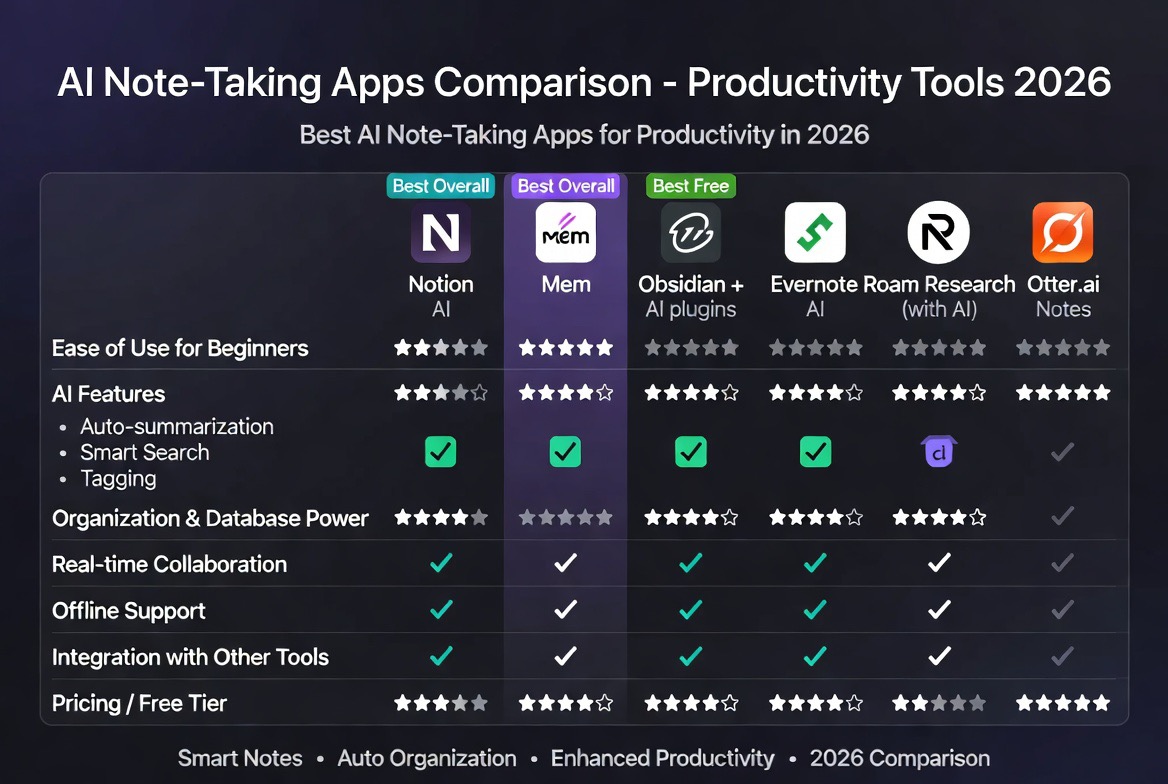
In this ai note taking apps comparison, we analyze the top platforms, compare their features, pricing, and ease of use, and help you decide which tool fits your workflow in 2026.
Explore:
ai productivity tools 2026
What Are AI Note Taking Apps
AI note taking apps are digital tools that use artificial intelligence to enhance how users capture, organize, and retrieve information. Unlike traditional note apps, these platforms offer smart suggestions, automatic summaries, and contextual organization.
- automatic note summarization
- voice-to-text transcription
- task extraction and reminders
- smart search and tagging
These features make AI-powered note-taking tools essential for students, professionals, and teams.
Top Note Taking Apps
Here are the leading tools in this ai note taking apps comparison:
Notion AI
Notion AI combines note-taking, task management, and AI writing features into a single platform.
- all-in-one workspace
- AI-powered summaries
- database and collaboration tools
Evernote
Evernote is a long-standing note-taking app that now integrates AI features for smarter organization.
- powerful note organization
- web clipping tools
- cross-platform syncing
Microsoft OneNote
Microsoft OneNote is a flexible and free tool integrated into the Microsoft ecosystem.
- free to use
- excellent for structured notes
- strong collaboration features
Obsidian
Obsidian is a powerful knowledge management tool focused on linking notes and building a “second brain.”
- local storage and privacy
- graph-based note linking
- plugin ecosystem
Mem AI
Mem AI is designed for AI-first note-taking with automatic organization and retrieval.
- AI-driven organization
- smart search
- minimal manual sorting
AI Note Taking Apps Comparison
This ai note taking apps comparison evaluates tools based on key criteria:
Features
Modern AI note-taking apps offer advanced features beyond basic note storage:
- Notion AI: content generation, summaries, task management
- Evernote: document scanning and organization
- OneNote: structured note-taking with collaboration
- Obsidian: knowledge graph and linking
- Mem AI: automatic note categorization
If you prioritize AI-powered writing and productivity, Notion AI stands out. For knowledge management, Obsidian is a strong contender.
Pricing
Pricing varies depending on features and usage:
- Notion AI: freemium with paid AI add-on
- Evernote: subscription-based plans
- OneNote: free with optional Microsoft 365
- Obsidian: free core, paid sync and add-ons
- Mem AI: premium-focused pricing
For detailed pricing:
ai productivity tools pricing
Ease of Use
Ease of use is a critical factor in this ai note taking apps comparison:
- beginner-friendly: OneNote, Notion AI
- moderate: Evernote
- advanced users: Obsidian
- minimalist workflows: Mem AI
Choosing the right tool depends on your experience level and workflow complexity.
Benefits of AI Note Taking Apps
Using AI note-taking tools offers several advantages:
- time efficiency: automate note organization
- better productivity: focus on important tasks
- improved recall: smart search and tagging
- collaboration: share and edit notes in real-time
These benefits make AI tools essential for modern productivity systems.
Best Use Cases
This ai note taking apps comparison highlights different use cases:
Students
Capture lectures, summarize notes, and organize study materials efficiently.
Professionals
Manage meetings, tasks, and project documentation.
Content Creators
Brainstorm ideas, draft content, and organize research.
Teams
Collaborate on shared documents and knowledge bases.
How to Choose the Best AI Note Taking App
To select the right tool, consider the following:
- your workflow needs
- required integrations
- budget constraints
- ease of use
Start with a free plan and upgrade as your needs grow.
Future of AI Note Taking Apps
The future of AI note taking apps includes:
- real-time AI assistants during meetings
- automatic knowledge graph creation
- deeper integration with productivity tools
- personalized AI suggestions
These innovations will further enhance productivity and knowledge management.
Conclusion
This ai note taking apps comparison shows that the best tool depends on your needs. Notion AI is ideal for all-in-one productivity, Evernote excels in organization, OneNote is great for beginners, Obsidian is perfect for advanced users, and Mem AI offers cutting-edge automation.
By choosing the right platform, you can significantly improve productivity and streamline your workflow in 2026.
Related:
AI writing tools comparison
Stay updated:
Tech News
FAQ
What is the best AI note taking app?
The best app depends on your needs. Notion AI is great for all-in-one productivity, while Obsidian is ideal for knowledge management.
Are AI note taking apps worth it?
Yes, they improve productivity, automate organization, and help users manage information more efficiently.
Do AI note taking apps work offline?
Some apps like Obsidian support offline use, while others require internet for AI features.
Which AI note taking app is best for students?
OneNote and Notion AI are popular choices for students due to ease of use and powerful features.

Leave a reply