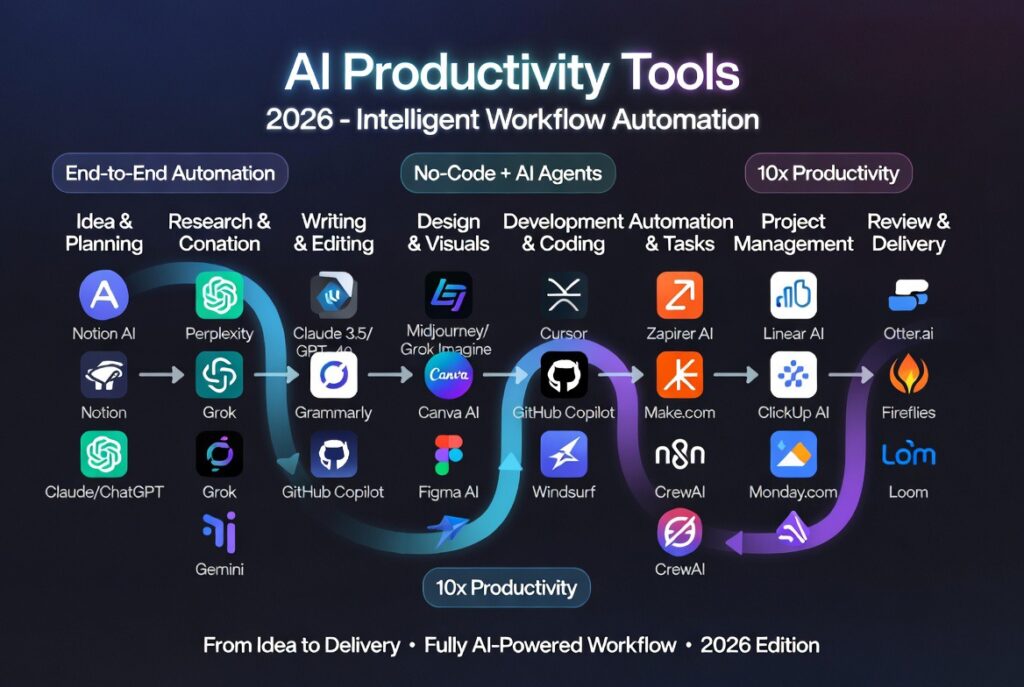
The Complete AI Productivity Tools 2026 Guide for Maximum Efficiency
AI productivity tools 2026 are transforming how individuals and teams manage tasks, automate workflows, and improve efficiency across industries. From writing assistants to automation platforms, artificial intelligence is now embedded into nearly every aspect of modern work.
Whether you’re a developer, marketer, founder, or student, adopting the right AI tools can significantly reduce manual effort and help you focus on high-impact tasks.

If you’re just starting your AI journey, explore our guide on
best AI productivity tools for beginners.
Why AI Productivity Tools Matter More Than Ever
The modern workplace is fast-paced and data-driven. Professionals are expected to deliver results quickly while managing multiple responsibilities. AI productivity tools help streamline this process by automating repetitive tasks and enhancing decision-making.
- Automated task management and reminders
- AI-powered writing and editing
- Smart scheduling and calendar optimization
- Workflow automation across apps and services
With remote work and global collaboration becoming the norm, these tools are essential for maintaining efficiency and staying competitive.
What Are AI Productivity Tools
AI productivity tools are software applications that use machine learning and natural language processing to assist with everyday tasks such as writing, organizing, communication, and automation.
These tools analyze user behavior, understand context, and provide intelligent recommendations or automate entire workflows.
For example, an AI writing assistant can generate blog posts, while an automation platform can connect multiple apps to perform tasks without human input.
Categories of AI Productivity Tools
AI Writing Tools
AI writing tools help create content faster by generating text, correcting grammar, and improving clarity.
- ChatGPT – conversational AI for writing and coding
- Grammarly – grammar and writing assistant
- Jasper AI – marketing content generation
Official links:
ChatGPT,
Grammarly
Task Management Tools
Task management tools help users organize projects, track progress, and collaborate with teams.
- Notion AI – all-in-one workspace with AI features
- Trello – visual task management
- ClickUp – project and productivity platform
Compare top tools:
Notion AI vs ChatGPT comparison
Meeting Assistants
AI meeting assistants record, transcribe, and summarize meetings automatically.
- Otter.ai
- Fireflies.ai
- Zoom AI Companion
Automation Platforms
Automation tools connect apps and automate workflows without manual intervention.
- Zapier
- Make (Integromat)
- n8n
Explore:
Zapier
Top AI Productivity Tools 2026
Here are some of the most impactful AI productivity tools in 2026:
- ChatGPT for writing, coding, and brainstorming
- Notion AI for knowledge management
- Grammarly for writing improvement
- Zapier for workflow automation
- Otter.ai for meeting transcription
- ClickUp for task management
Each tool focuses on a specific aspect of productivity, and combining them can create a powerful workflow system.
How AI Productivity Tools Improve Efficiency
AI productivity tools eliminate repetitive work and enable faster decision-making. Instead of spending hours on manual tasks, users can automate processes and focus on strategic work.
- Reduce time spent on routine tasks
- Improve accuracy with AI assistance
- Enhance collaboration across teams
- Increase output without increasing workload
For example, a content creator can use AI to generate drafts, edit content, and schedule posts-all within minutes.
Choosing the Right AI Productivity Tools
Selecting the right tools depends on your workflow, budget, and goals.
- Choose writing tools for content creation
- Use automation tools for repetitive workflows
- Select task managers for team collaboration
- Pick meeting assistants for remote work
For cost breakdown, see:
AI productivity tools pricing.
AI Productivity Tools Review
To explore in-depth reviews and performance comparisons, check:
AI productivity tools review.
Real-World Use Cases
AI productivity tools are used across industries:
- Marketing teams generate content faster
- Developers automate workflows
- Businesses streamline operations
- Students improve learning efficiency
These tools are no longer optional-they are essential for staying competitive.
Future of AI Productivity Tools 2026
The future of AI productivity tools is centered around autonomy and intelligence. Tools are evolving into full AI agents capable of completing complex workflows independently.
- AI agents managing tasks automatically
- Autonomous workflows across multiple tools
- Personal AI assistants handling daily operations
- Deeper integration with enterprise systems
In the coming years, AI tools will shift from assistants to decision-makers, fundamentally changing how work is done.
Deep Dive: How AI Productivity Tools Transform Daily Workflows
AI productivity tools 2026 are not just about saving time-they fundamentally change how work gets done. Instead of manually switching between apps, managing tasks, and coordinating workflows, AI tools act as a central intelligence layer across your entire workflow.
For example, a typical workflow might include writing content, scheduling posts, tracking analytics, and responding to emails. With AI tools, these steps can be partially or fully automated, reducing manual effort and increasing output.
- AI generates first drafts and outlines
- Automation tools publish content across platforms
- AI assistants summarize analytics reports
- Smart notifications prioritize important tasks
This shift allows professionals to focus more on strategy, creativity, and decision-making rather than repetitive execution.
AI Productivity Tools for Different Professions
AI productivity tools 2026 are widely used across multiple industries, with each profession benefiting from different tool categories.
Developers
Developers use AI tools to automate coding, debugging, and deployment workflows. Tools like ChatGPT and automation platforms help reduce development time significantly.
Marketers
Marketing teams use AI for content creation, SEO optimization, email automation, and campaign management.
Entrepreneurs
Founders leverage AI tools to manage operations, generate business ideas, and automate customer interactions.
Students and Researchers
Students use AI for note-taking, summarization, research assistance, and study planning.
This versatility is one of the main reasons AI productivity tools are becoming essential in 2026.
Common Mistakes When Using AI Productivity Tools
While AI productivity tools 2026 are powerful, many users fail to get the most out of them due to common mistakes.
- Over-relying on AI without reviewing outputs
- Using too many tools instead of optimizing a few
- Not integrating tools into a single workflow
- Ignoring data privacy and security concerns
To maximize efficiency, it’s important to use AI as an assistant-not a replacement for human thinking.
How to Build an AI Productivity Stack
A well-structured AI productivity stack combines multiple tools to create a seamless workflow. Instead of using tools in isolation, the goal is to connect them into a unified system.
A typical stack might include:
- AI writing tool for content creation
- Task manager for organizing work
- Automation platform for connecting apps
- Meeting assistant for capturing insights
By combining these tools, you can create an end-to-end automated workflow that significantly improves productivity.
AI Productivity Tools for Teams vs Individuals
AI productivity tools 2026 serve both individuals and teams, but their usage differs depending on the context.
For Individuals
- Focus on personal productivity and time management
- Use AI for writing, scheduling, and automation
- Optimize daily workflows
For Teams
- Improve collaboration and communication
- Automate project management workflows
- Integrate tools across departments
Teams benefit more from integrated systems, while individuals can achieve results with fewer tools.
Security and Privacy Considerations
As AI productivity tools become more integrated into workflows, security and data privacy are critical concerns.
- Avoid sharing sensitive data with AI tools
- Use tools with strong encryption and compliance standards
- Review privacy policies before adoption
Businesses, in particular, must ensure that AI tools meet regulatory requirements and data protection standards.
How to Maximize ROI from AI Productivity Tools
To get the most value from AI productivity tools 2026, users should focus on measurable outcomes rather than just features.
- Track time saved using automation
- Measure output improvements (content, code, tasks)
- Reduce operational costs through efficiency
Many organizations report significant ROI when AI tools are properly implemented and integrated into workflows.
The key is not just adopting AI tools, but using them strategically to enhance productivity.
AI productivity tools are reshaping how work is done across industries. From automating repetitive tasks to enabling smarter decision-making, these tools are becoming essential for modern professionals.
As technology continues to evolve, the ability to effectively use AI tools will become a critical skill. Those who adapt early will gain a strong competitive advantage in productivity, efficiency, and innovation.
Conclusion
AI productivity tools are essential for anyone looking to optimize workflows and stay competitive in a fast-paced digital world. By adopting the right tools, individuals and teams can significantly improve efficiency, reduce workload, and achieve better results.
As AI continues to evolve, those who embrace these tools early will gain a significant advantage in productivity and innovation.
FAQ
What are AI productivity tools?
AI productivity tools help automate tasks, improve workflows, and increase efficiency using artificial intelligence.
What are the best AI productivity tools 2026?
Popular tools include ChatGPT, Notion AI, Grammarly, Zapier, and ClickUp.
Are AI productivity tools worth it?
Yes, they save time, automate repetitive tasks, and improve overall productivity.

Leave a reply